
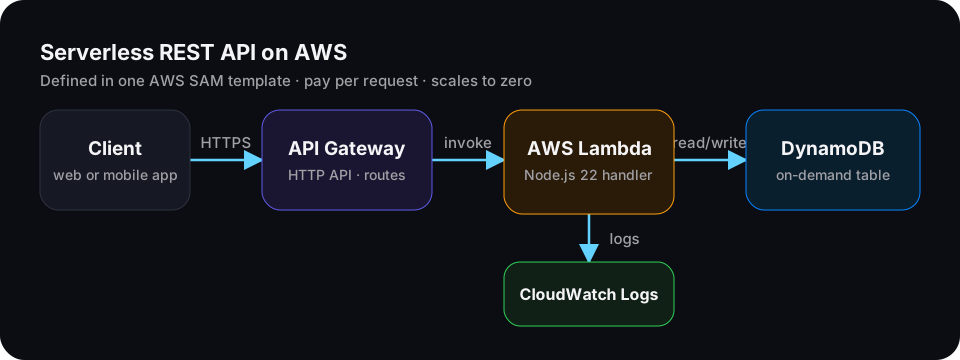
The best way to understand serverless is to deploy something real. In this tutorial you'll build a small notes API with create, read, list and delete endpoints, and deploy it to AWS with one command.
You'll use:
- AWS SAM to define the whole stack in one file and deploy it.
- Amazon API Gateway (HTTP API) to receive HTTPS requests.
- AWS Lambda with Node.js 22 to run the code.
- Amazon DynamoDB to store the notes.
New to serverless? Read What Is Serverless? first.
What you'll build
| Method | Path | What it does |
|---|---|---|
POST | /notes | Create a note |
GET | /notes | List notes |
GET | /notes/:id | Get one note |
DELETE | /notes/:id | Delete a note |
Prerequisites
- An AWS account. Create an AWS Budget alert first (Billing → Budgets) so you're never surprised. This project fits comfortably in the free tier for learning.
- The AWS CLI, configured with
aws configureoraws configure sso. - The AWS SAM CLI.
- Node.js 22 installed locally.
Check the tools:
aws --version
sam --version
node --version
Step 1: Create the project
mkdir notes-api && cd notes-api
mkdir src
npm init -y
Your project will look like this:
notes-api/
├── template.yaml      ← the whole stack: API, function, table, permissions
├── package.json
└── src/
    └── handler.mjs    ← the Lambda function
Step 2: Define the stack in template.yaml
This one file creates the table, the function, the API and the permissions between them.
AWSTemplateFormatVersion: "2010-09-09"
Transform: AWS::Serverless-2016-10-31
Description: Serverless notes API

Globals:
  Function:
    Runtime: nodejs22.x
    Architectures: [arm64]       # Graviton: lower price per ms than x86
    MemorySize: 512
    Timeout: 10
    Environment:
      Variables:
        TABLE_NAME: !Ref NotesTable

Resources:
  NotesTable:
    Type: AWS::DynamoDB::Table
    Properties:
      BillingMode: PAY_PER_REQUEST   # no capacity planning; pay per request
      AttributeDefinitions:
        - AttributeName: id
          AttributeType: S
      KeySchema:
        - AttributeName: id
          KeyType: HASH
      PointInTimeRecoverySpecification:
        PointInTimeRecoveryEnabled: true

  NotesFunction:
    Type: AWS::Serverless::Function
    Properties:
      CodeUri: src/
      Handler: handler.handler
      Policies:
        - DynamoDBCrudPolicy:          # only this table, only CRUD actions
            TableName: !Ref NotesTable
      Events:
        CreateNote:
          Type: HttpApi
          Properties: { Path: /notes, Method: POST }
        ListNotes:
          Type: HttpApi
          Properties: { Path: /notes, Method: GET }
        GetNote:
          Type: HttpApi
          Properties: { Path: /notes/{id}, Method: GET }
        DeleteNote:
          Type: HttpApi
          Properties: { Path: /notes/{id}, Method: DELETE }

  NotesFunctionLogs:
    Type: AWS::Logs::LogGroup
    Properties:
      LogGroupName: !Sub /aws/lambda/${NotesFunction}
      RetentionInDays: 14            # don't keep logs (and pay for them) forever

Outputs:
  ApiUrl:
    Description: Base URL of the API
    Value: !Sub https://${ServerlessHttpApi}.execute-api.${AWS::Region}.amazonaws.com
A few choices worth understanding:
PAY_PER_REQUESTmeans DynamoDB scales automatically and you pay per read and write.DynamoDBCrudPolicygives the function access to this one table only. That's least privilege, and it's the habit that keeps real systems safe.arm64runs on AWS Graviton, which is cheaper per millisecond than x86 for most Node.js code.- A log group with retention stops CloudWatch Logs from growing forever.
Step 3: Write the Lambda handler
The Node.js 22 Lambda runtime includes the AWS SDK for JavaScript v3, so you don't need to bundle it.
Create src/handler.mjs:
import { DynamoDBClient } from "@aws-sdk/client-dynamodb";
import {
  DynamoDBDocumentClient,
  PutCommand,
  GetCommand,
  ScanCommand,
  DeleteCommand,
} from "@aws-sdk/lib-dynamodb";
import { randomUUID } from "node:crypto";

// Created once per execution environment and reused across invocations.
const db = DynamoDBDocumentClient.from(new DynamoDBClient({}));
const TABLE = process.env.TABLE_NAME;

const json = (statusCode, body) => ({
  statusCode,
  headers: { "content-type": "application/json" },
  body: JSON.stringify(body),
});

export const handler = async (event) => {
  const method = event.requestContext.http.method;
  const id = event.pathParameters?.id;

  try {
    if (method === "POST") {
      const input = JSON.parse(event.body ?? "{}");
      const text = typeof input.text === "string" ? input.text.trim() : "";
      if (!text || text.length > 1000) {
        return json(400, { error: "text is required (1-1000 characters)" });
      }
      const note = { id: randomUUID(), text, createdAt: new Date().toISOString() };
      await db.send(new PutCommand({ TableName: TABLE, Item: note }));
      return json(201, note);
    }

    if (method === "GET" && id) {
      const { Item } = await db.send(new GetCommand({ TableName: TABLE, Key: { id } }));
      return Item ? json(200, Item) : json(404, { error: "Note not found" });
    }

    if (method === "GET") {
      // Fine for a small demo. For real data, design a Query on a key instead of Scan.
      const { Items } = await db.send(new ScanCommand({ TableName: TABLE, Limit: 50 }));
      return json(200, Items ?? []);
    }

    if (method === "DELETE" && id) {
      await db.send(new DeleteCommand({ TableName: TABLE, Key: { id } }));
      return json(204, {});
    }

    return json(405, { error: "Method not allowed" });
  } catch (error) {
    if (error instanceof SyntaxError) return json(400, { error: "Body must be valid JSON" });
    console.error(JSON.stringify({ message: "Unhandled error", error: error.message }));
    return json(500, { error: "Internal server error" });
  }
};
Notice what the code doesn't do: it never opens a server, never listens on a port, and never manages a connection pool. API Gateway calls the function, and Lambda handles concurrency.
Step 4: Deploy
sam build
sam deploy --guided
The guided deploy asks a few questions. Good answers for a first deploy:
- Stack name:
notes-api - Region: the one closest to your users, for example
ap-south-1(Mumbai) - Confirm changes before deploy:
y - Allow SAM CLI IAM role creation:
y - NotesFunction has no authentication. Is this okay?
yfor this demo (see "Make it production-ready" below) - Save arguments to configuration file:
y, so next time you only runsam deploy
When it finishes, SAM prints the ApiUrl output. Copy it.
Step 5: Test it
On Windows PowerShell, use curl.exe (with .exe) so you get real curl. Replace the URL with yours:
API=https://abc123.execute-api.ap-south-1.amazonaws.com

# Create
curl -X POST "$API/notes" -H "content-type: application/json" -d '{"text":"My first serverless note"}'

# List
curl "$API/notes"

# Get one (use an id from the create response)
curl "$API/notes/PASTE-ID-HERE"

# Delete
curl -X DELETE "$API/notes/PASTE-ID-HERE"
Step 6: Read the logs
When something breaks, logs are the first place to look:
sam logs --stack-name notes-api --tailEvery invocation also writes a REPORT line with its duration, billed duration, memory used and, on a cold start, the init duration. That line tells you exactly what you're paying for.
Make it production-ready
The demo works, but a real API needs a few more things. Here's the checklist I use:
- Authentication. Add a JWT authorizer on the HTTP API with Amazon Cognito or another identity provider, so only signed-in users can call it.
- Replace Scan with Query. Scans read the whole table. Store notes under a user key and query by it. DynamoDB Single-Table Design for Beginners shows how.
- Validation. Validate every input, as the
POSThandler does, and return clear 400 errors. - Throttling. Set default route throttling on the API so one client can't run up your bill.
- Structured logs and tracing. Log JSON, and turn on AWS X-Ray or use Powertools for AWS Lambda for tracing and metrics.
- Alarms. Create CloudWatch alarms on Lambda errors and API 5xx responses.
- CORS. If a browser app calls the API, configure CORS on the HTTP API for your domain only.
- CI/CD. Deploy from GitHub Actions or AWS CodePipeline instead of your laptop.
Clean up
Delete everything so nothing keeps costing money:
sam delete --stack-name notes-apiWhat you learned
- One AWS SAM template defined an API, a function, a database and the permissions between them.
- The function scales automatically, costs nothing when idle, and has access to exactly one table.
sam build,sam deployandsam logscover most of your daily work.
Next, learn why the first request is sometimes slower in AWS Lambda Cold Starts Explained, then make the system event-driven in Event-Driven Serverless with EventBridge, SQS and Lambda.