
Some jobs are a series of steps: do this, then that, wait, retry if it fails, and tell someone at the end. You can glue those steps together with code, but the glue grows into the most fragile part of your system.
AWS Step Functions does the glue for you. You describe the steps as a state machine, and Step Functions runs them, retries failures, waits when you ask, and records every run so you can see exactly what happened.
Quick summary
- Step Functions runs a list of steps (a state machine) and handles ordering, retries, waits and error paths for you.
Retryhandles temporary failures,Catchhandles permanent ones, andMaploops over a list at a speed you control.- Use Standard workflows for long, important processes and Express for short, high-volume jobs.
What Step Functions is, in plain words
A state machine is a list of steps (called states) and the rules for moving between them. Each step can:
- Call a service, such as a Lambda function, DynamoDB, SQS or Amazon SES.
- Make a decision, such as "if the score is above 80, go to Pass".
- Wait, for a few seconds or until a date.
- Run things in parallel or loop over a list.
You write it in JSON (Amazon States Language) or draw it in Workflow Studio, the visual editor in the AWS console.
When to use it
| Use Step Functions when | Use plain Lambda or a queue when |
|---|---|
| Steps must run in order | It's a single short task |
| You need retries with backoff per step | One retry policy for the whole job is enough |
| You need to wait minutes, hours or days | The work finishes in seconds |
| You want a visual history of every run | You only need logs |
| Several services are involved | One function does everything |
The example: issuing workshop certificates
After a workshop, we want to:
- Fetch the attendees who checked in.
- For each attendee, generate a PDF certificate and email it.
- Retry if the email service is busy.
- Record who got their certificate and who failed.
- Notify the organizer with a summary.
Here is the whole workflow on one page. Keep this picture in mind as you read the JSON below.
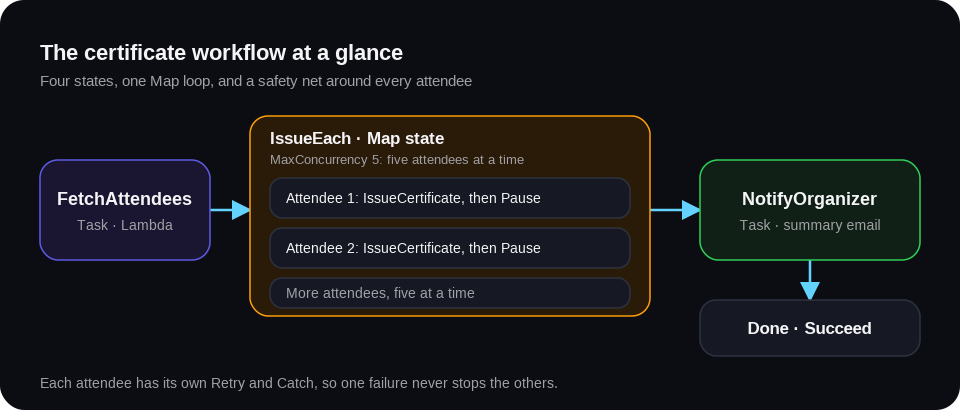 The certificate workflow: fetch the list, loop over attendees five at a time, then notify the organizer.
Step 1: Understand the state types we'll use
| State | What it does in our workflow |
|---|---|
Task | Calls a Lambda function, for example "fetch attendees" |
Map | Runs the same steps for every attendee in a list |
Wait | Pauses so we don't hit the email provider too fast |
Pass | Records a failed attendee without calling anything |
Succeed | Ends the run with a clear result |
Step Functions also has a Choice state for if/else branches and a Parallel state for running different branches at the same time. We don't need them here.
Step 2: Write the state machine
{
  "Comment": "Issue workshop certificates",
  "StartAt": "FetchAttendees",
  "States": {
    "FetchAttendees": {
      "Type": "Task",
      "Resource": "arn:aws:states:::lambda:invoke",
      "Parameters": { "FunctionName": "${FetchAttendeesFn}", "Payload.$": "$" },
      "ResultSelector": { "attendees.$": "$.Payload.attendees" },
      "Next": "IssueEach"
    },
    "IssueEach": {
      "Type": "Map",
      "ItemsPath": "$.attendees",
      "MaxConcurrency": 5,
      "ItemProcessor": {
        "ProcessorConfig": { "Mode": "INLINE" },
        "StartAt": "IssueCertificate",
        "States": {
          "IssueCertificate": {
            "Type": "Task",
            "Resource": "arn:aws:states:::lambda:invoke",
            "Parameters": { "FunctionName": "${IssueCertificateFn}", "Payload.$": "$" },
            "Retry": [
              {
                "ErrorEquals": ["Lambda.TooManyRequestsException", "States.Timeout", "ProviderBusy"],
                "IntervalSeconds": 2,
                "BackoffRate": 2,
                "MaxAttempts": 4,
                "JitterStrategy": "FULL"
              }
            ],
            "Catch": [
              { "ErrorEquals": ["States.ALL"], "ResultPath": "$.error", "Next": "MarkFailed" }
            ],
            "ResultSelector": { "status": "issued" },
            "Next": "Pause"
          },
          "MarkFailed": {
            "Type": "Pass",
            "Parameters": { "status": "failed", "email.$": "$.email" },
            "Next": "Pause"
          },
          "Pause": { "Type": "Wait", "Seconds": 1, "End": true }
        }
      },
      "ResultPath": "$.results",
      "Next": "NotifyOrganizer"
    },
    "NotifyOrganizer": {
      "Type": "Task",
      "Resource": "arn:aws:states:::lambda:invoke",
      "Parameters": { "FunctionName": "${NotifyFn}", "Payload.$": "$" },
      "Next": "Done"
    },
    "Done": { "Type": "Succeed" }
  }
}
Read it top to bottom and it describes the process in order. A few parts deserve a closer look.
Retry: automatic, with backoff
The Retry block on IssueCertificate says: if Lambda is throttled, the step times out, or our function throws a ProviderBusy error, try again. The first retry waits about 2 seconds, then 4, then 8, then 16. MaxAttempts: 4 means up to four retries after the first call, so five calls in total. JitterStrategy: FULL picks a random wait up to each limit, so all attendees don't retry at the same moment.
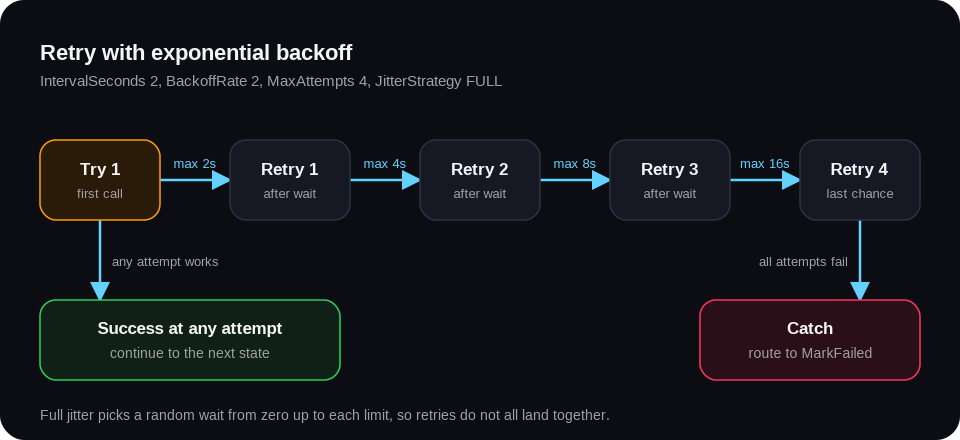 Each retry waits longer than the last, and a random jitter spreads the retries out.
You throw a named error from Lambda simply by setting the error's name:
export const handler = async (attendee) => {
  const response = await sendCertificate(attendee);
  if (response.status === 429) {
    const error = new Error("Email provider is busy");
    error.name = "ProviderBusy";   // Step Functions matches this name in Retry
    throw error;
  }
  return { email: attendee.email };
};
Catch: fail one attendee, not the whole run
If an attendee still fails after all retries, Catch sends them to MarkFailed instead of crashing the workflow. The other attendees keep going.
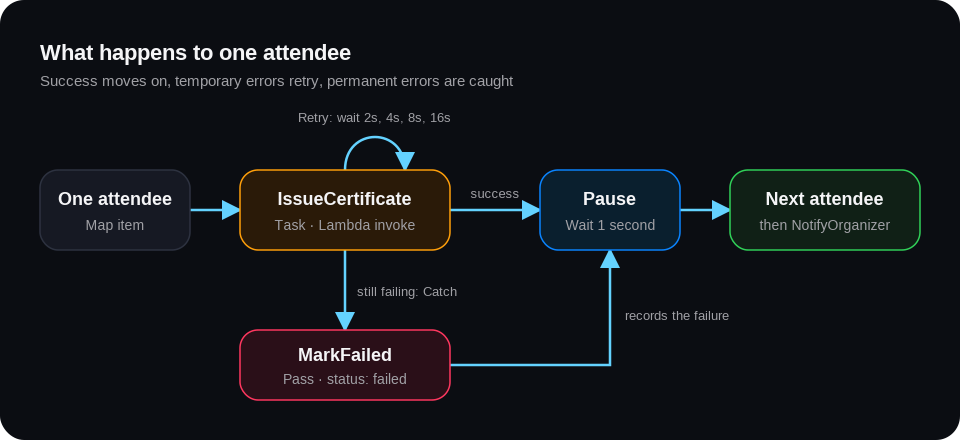 Inside one attendee's run: success, retry loop and the Catch path to MarkFailed.
Map with MaxConcurrency: control the speed
Map runs the steps for every attendee. MaxConcurrency: 5 means at most five run at once, which protects your email provider's rate limit. For very large lists (thousands of items), use distributed Map mode, which can read the list from an S3 file.
Step 3: Deploy it with AWS SAM
CertificateWorkflow:
  Type: AWS::Serverless::StateMachine
  Properties:
    Type: STANDARD
    DefinitionUri: statemachine/certificates.asl.json
    DefinitionSubstitutions:
      FetchAttendeesFn: !GetAtt FetchAttendeesFunction.Arn
      IssueCertificateFn: !GetAtt IssueCertificateFunction.Arn
      NotifyFn: !GetAtt NotifyFunction.Arn
    Policies:
      - LambdaInvokePolicy: { FunctionName: !Ref FetchAttendeesFunction }
      - LambdaInvokePolicy: { FunctionName: !Ref IssueCertificateFunction }
      - LambdaInvokePolicy: { FunctionName: !Ref NotifyFunction }
DefinitionSubstitutions fills in the ${...} placeholders with real function ARNs, so the JSON stays readable.
Step 4: Run it and watch it
Start a run from the console or the CLI:
aws stepfunctions start-execution \
  --state-machine-arn arn:aws:states:ap-south-1:ACCOUNT_ID:stateMachine:CertificateWorkflow \
  --input '{"workshopId":"aws-101"}'
Open the run in the console. You'll see the graph light up as each step finishes, with the input and output of every step. When something fails, click the red step to see the exact error. That visibility alone is worth using Step Functions.
Standard or Express?
| Standard | Express | |
|---|---|---|
| Maximum duration | Up to 1 year | Up to 5 minutes |
| Best for | Long, important business processes | High-volume, short jobs like stream processing |
| Run history | Full visual history in the console | Logs to CloudWatch |
| Pricing model | Per state transition | Per request and duration |
Our certificate workflow is Standard: it's important, it waits, and we want the history.
Common beginner mistakes
- Putting everything in one Lambda function. If one function does five things, Step Functions can't retry just the failed part. Give each step its own small task.
- No
Catchinside aMap. One failing item then fails the whole run. Catch errors per item. - Passing huge payloads between steps. Each state's input and output has a size limit. Store large data in S3 or DynamoDB and pass a key instead.
- Retrying errors that will never succeed. Retry throttling and timeouts, not validation errors like "invalid email". Those should go straight to
Catch. - Forgetting about cost in tight loops. Standard workflows are billed per state transition. A
Waitinside a loop of millions of items adds up. Use distributed Map or Express for very high volume.
Key takeaways
- Step Functions replaces fragile glue code with a visible, retryable workflow.
Retryhandles temporary failures,Catchhandles permanent ones, andMapprocesses lists with controlled speed.- Keep each step small, pass references instead of big payloads, and use Standard for important long-running processes.
Step Functions pairs well with events. See Event-Driven Serverless on AWS for when to use events between services and workflows inside a process.
Found this useful?
Share it with your group