
Serverless can be almost free for small projects. It can also produce a surprise bill if you don't know where the money goes. The difference is usually a few settings.
Here's how serverless billing works, where beginners get surprised, and twelve habits that keep your bill near zero.
Quick summary
- Set an AWS Budget alert before you build anything.
- You pay per request and per unit of work, and most services have a free tier.
- The usual surprises are NAT Gateways, logs kept forever, DynamoDB Scans and forgotten resources.
- Right-size Lambda memory, use arm64, set timeouts and log retention, and Query instead of Scan.
First: set a budget alert (do this today)
Before anything else, open Billing and Cost Management → Budgets and create a monthly budget with an email alert, for example at a small amount you'd be uncomfortable passing. It takes two minutes and is the single best protection against surprises.
How serverless services are billed
Each service has its own meter. This picture shows what each one counts.
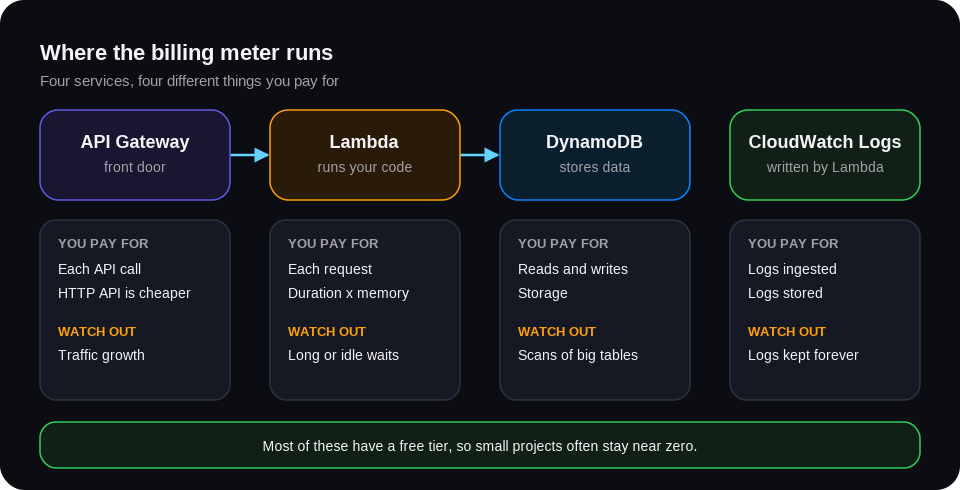 Each service has its own billing meter, and each has one thing to watch.
| Service | You pay for | Cost goes up when |
|---|---|---|
| Lambda | Number of requests, plus duration × memory (GB-seconds) | Functions run long, use lots of memory, or run very often |
| API Gateway | Number of API calls (HTTP APIs cost less than REST APIs) | Traffic grows |
| DynamoDB on-demand | Reads, writes and storage | You Scan large tables or write a lot |
| S3 | Storage, requests and data transfer out | You store large files or serve them directly to many users |
| CloudWatch Logs | Data ingested and stored | Functions log a lot and logs are kept forever |
| Step Functions Standard | State transitions | Workflows have many steps or run in tight loops |
| Data transfer | Data leaving AWS to the internet | You serve big files without a CDN |
Most of these have a generous free tier, which is why small projects often cost nothing.
The hidden costs that surprise beginners
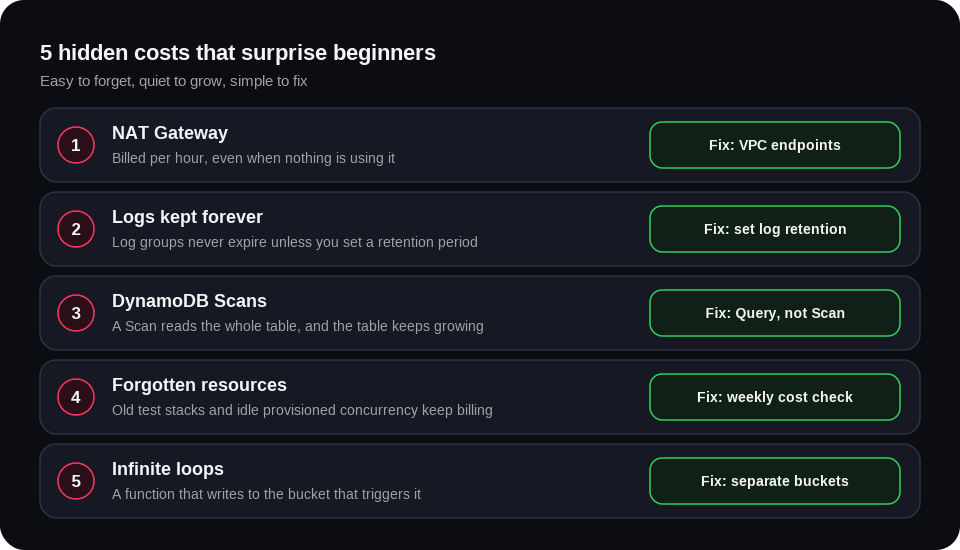 Five quiet costs and how to avoid each one.
- NAT Gateways. Putting a Lambda function in a VPC that needs internet access usually means a NAT Gateway, which is billed per hour even when idle. Many student bills come from this alone.
- CloudWatch Logs kept forever. By default, log groups never expire. Verbose logging plus no retention quietly grows every month.
- DynamoDB Scans. A Scan reads the whole table. On a growing table, a Scan in a popular API endpoint becomes expensive fast.
- Forgotten resources. A test stack, an idle provisioned-concurrency setting or an old load balancer keeps billing after you've moved on.
- Infinite loops. A Lambda function that writes to the same S3 bucket that triggers it can call itself forever. AWS has loop detection for some services, but design so it can't happen.
12 ways to keep the bill near zero
Lambda
1. Right-size memory. Lambda bills duration × memory, and more memory also gives more CPU. Sometimes doubling memory makes a function more than twice as fast, so it costs less. Measure with AWS Lambda Power Tuning instead of guessing.
2. Use arm64 (Graviton). arm64 is priced lower per GB-second than x86, and most Node.js and Python code runs unchanged:
Globals:
  Function:
    Architectures: [arm64]
3. Don't wait inside a function. A function that sleeps or polls is billed for every second it waits. Use a Step Functions Wait state or an SQS delay instead.
4. Set timeouts. Give each function a realistic timeout, like 10 seconds for an API, so a stuck call doesn't bill for the 15-minute maximum.
5. Use provisioned concurrency only where it pays off. It's billed while configured. Keep it for a few latency-critical functions, and schedule it down at night.
APIs and data
6. Prefer HTTP APIs over REST APIs in API Gateway when you don't need REST-only features. HTTP APIs cost less per request and are simpler.
7. Cache with CloudFront. Responses that don't change per user, like event listings, can be cached at the edge. Cached requests never reach API Gateway or Lambda.
8. Query, don't Scan. Design DynamoDB keys around your access patterns so every request is a cheap Query. See DynamoDB Single-Table Design for Beginners.
9. Use TTL to delete old data for free. DynamoDB Time to Live deletes expired items, like sessions or idempotency keys, without charging for the deletes.
Logs, storage and networking
10. Set log retention everywhere. Add a retention period to every log group, and log less in production:
MyFunctionLogs:
  Type: AWS::Logs::LogGroup
  Properties:
    LogGroupName: !Sub /aws/lambda/${MyFunction}
    RetentionInDays: 14
11. Avoid NAT Gateways when you can. Only put Lambda in a VPC when it must reach private resources. To reach S3 or DynamoDB from a VPC, use VPC gateway endpoints, which have no hourly charge, instead of routing through a NAT Gateway.
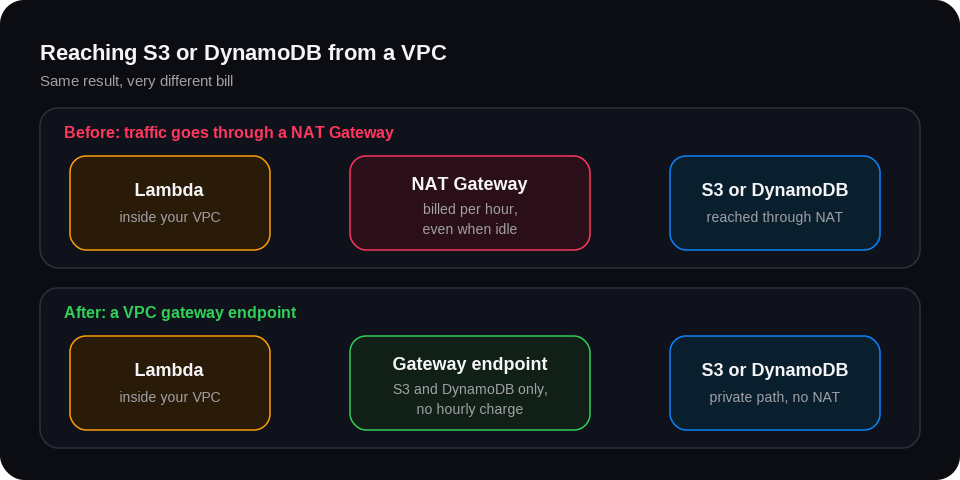 Swapping a NAT Gateway for a gateway endpoint removes an hourly charge for S3 and DynamoDB traffic.
12. Use S3 lifecycle rules. Move old files to cheaper storage classes automatically, and delete temporary uploads after a few days.
A weekly 5-minute cost check
- Open Cost Explorer, group by Service, and look at the last 7 days.
- Anything unexpected? Group by Usage type to see exactly what it is.
- Check for idle resources: NAT Gateways, provisioned concurrency, test stacks.
- Delete what you don't need:
sam delete --stack-name your-test-stack.
Tag every resource with a project name, like Project: notes-api, so you can see the cost of each project separately.
A realistic example
A student project like the notes API with a few thousand requests a month, on-demand DynamoDB, 14-day log retention and no NAT Gateway typically stays within the free tier. The same project with a NAT Gateway and verbose logs kept forever can cost real money every month while doing exactly the same work.
Key takeaways
- Create a budget alert before you build anything.
- The biggest surprises are NAT Gateways, endless logs, Scans and forgotten resources.
- Right-size memory, use arm64, set timeouts and log retention, cache with CloudFront, and Query instead of Scan.
- Check Cost Explorer for five minutes every week.
New to serverless? Start with What Is Serverless?, then build your first serverless API.
Found this useful?
Share it with your group