
Serverless removes a lot of security work: no operating systems to patch, no open SSH ports. It doesn't remove all of it. Your code, permissions and configuration are still your responsibility.
This is the checklist I use to secure a serverless API on AWS, from most important to least. Each step includes the configuration to copy.
Quick summary
- Give every function its own least-privilege role.
- Require sign-in with a JWT authorizer and read the user ID from verified claims.
- Validate input, keep secrets in Secrets Manager, throttle the API and limit CORS to your domain.
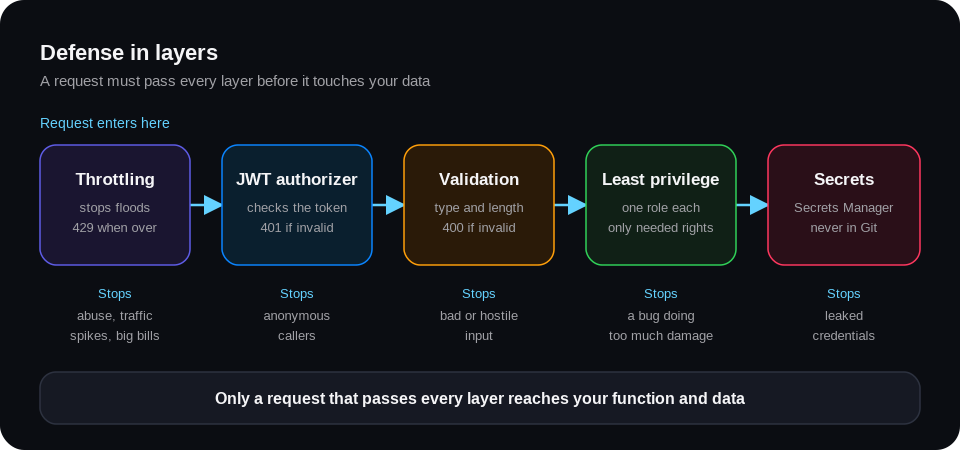 A request must pass every layer before it reaches your function and your data.
The shared responsibility, simply
| AWS secures | You secure |
|---|---|
| The servers, network and runtime patches | Who can call your API |
| Lambda's isolation between customers | What your function is allowed to do (IAM) |
| The physical data centers | Your code, input validation and dependencies |
| Encryption features | Turning them on and managing secrets |
1. Give every function least-privilege permissions
Each Lambda function runs with an execution role. If that role can do everything, a bug in your code can do everything too.
Grant only the actions the function needs, on only the resources it uses. AWS SAM policy templates make this easy:
CreateNoteFunction:
  Type: AWS::Serverless::Function
  Properties:
    Handler: create.handler
    Policies:
      - DynamoDBWritePolicy:
          TableName: !Ref NotesTable     # write to one table, nothing else
Avoid policies like AmazonDynamoDBFullAccess or "Action": "*". Use one role per function so a read-only function can never delete data.
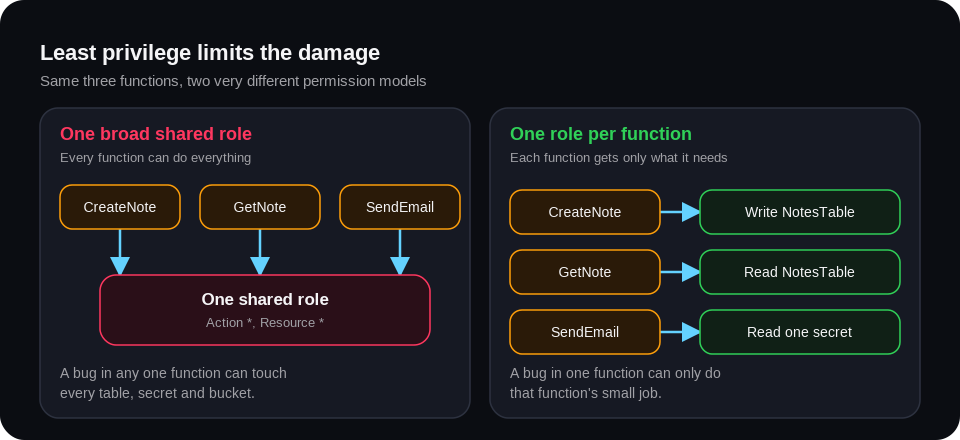 One role per function means a bug can only reach that function's small job.
2. Require sign-in with a JWT authorizer
Don't leave write endpoints open to the internet. HTTP APIs in API Gateway support JWT authorizers, which check a token before your function even runs.
With Amazon Cognito as the identity provider:
NotesApi:
  Type: AWS::Serverless::HttpApi
  Properties:
    Auth:
      DefaultAuthorizer: CognitoJwt
      Authorizers:
        CognitoJwt:
          IdentitySource: $request.header.Authorization
          JwtConfiguration:
            issuer: !Sub https://cognito-idp.${AWS::Region}.amazonaws.com/${UserPool}
            audience:
              - !Ref UserPoolClient
Invalid or missing tokens get a 401 from API Gateway, so your function never runs and you don't pay for it.
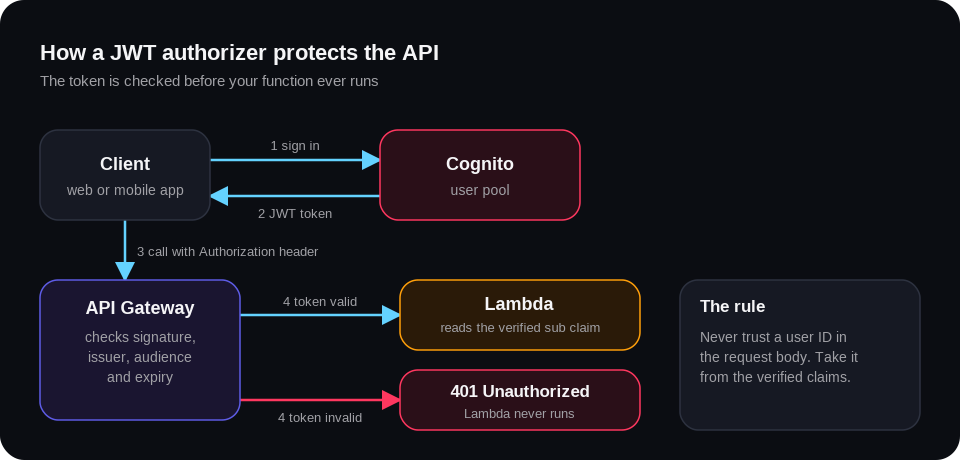 API Gateway checks the token first. Bad tokens never reach your code.
Inside the function, read the user's ID from the verified claims, never from the request body:
export const handler = async (event) => {
  const userId = event.requestContext.authorizer.jwt.claims.sub;   // verified by API Gateway
  // Store and query notes under this userId only.
};
That last line prevents a classic bug: a user changing an ID in the request to read someone else's data.
3. Validate every input
Treat all input as untrusted: the body, path parameters, query strings and headers.
- Check types, required fields and lengths.
- Reject unknown fields.
- Return a clear
400for bad input.
function parseNote(body) {
  const input = JSON.parse(body ?? "{}");
  const text = typeof input.text === "string" ? input.text.trim() : "";
  if (!text || text.length > 1000) throw new ValidationError("text must be 1-1000 characters");
  return { text };
}
For larger APIs, use a schema library such as Zod, or Powertools for AWS Lambda's validation utility.
4. Keep secrets out of code and plain environment variables
API keys and database passwords don't belong in Git or in plain-text environment variables.
- Store them in AWS Secrets Manager or SSM Parameter Store (SecureString).
- Give the function permission to read only that secret.
- Read it once and cache it, so you don't call Secrets Manager on every request.
import { SecretsManagerClient, GetSecretValueCommand } from "@aws-sdk/client-secrets-manager";
const secrets = new SecretsManagerClient({});
let cachedKey;

async function emailApiKey() {
  if (!cachedKey) {
    const { SecretString } = await secrets.send(new GetSecretValueCommand({ SecretId: "notes/email-api-key" }));
    cachedKey = SecretString;
  }
  return cachedKey;
}
The AWS Parameters and Secrets Lambda Extension can also cache secrets for you.
5. Throttle the API
Throttling protects both your backend and your bill. Set a default limit on the HTTP API stage:
NotesApi:
  Type: AWS::Serverless::HttpApi
  Properties:
    DefaultRouteSettings:
      ThrottlingRateLimit: 20      # requests per second
      ThrottlingBurstLimit: 40
You can also set reserved concurrency on a function to cap how many copies run at once, so one busy endpoint can't use all your account's concurrency.
For public endpoints like sign-up forms, put AWS WAF in front of CloudFront or API Gateway to block abusive traffic.
6. Configure CORS for your domain only
If a browser app calls the API, allow only your own origin:
CorsConfiguration:
  AllowOrigins:
    - https://pawanjoshi.dev
  AllowMethods: [GET, POST, DELETE]
  AllowHeaders: [authorization, content-type]
Avoid * for APIs that use credentials. CORS isn't authentication, but a tight configuration stops other websites from calling your API from users' browsers.
7. Encrypt and protect data
- DynamoDB and S3 encrypt data at rest by default. Use a customer managed KMS key if you need control over the key.
- Keep S3 Block Public Access on. Serve files through CloudFront with Origin Access Control instead of public buckets.
- Turn on DynamoDB point-in-time recovery for tables you can't afford to lose.
8. Log safely and watch for problems
- Log in structured JSON, with a request ID on every line.
- Never log tokens, passwords or full personal data.
- Turn on AWS CloudTrail to record who changed what in your account.
- Create CloudWatch alarms on API
4xxand5xxspikes and Lambda errors. A sudden rise in401s or403s can mean someone is probing your API.
9. Keep dependencies clean
Most vulnerabilities come from packages, not your own code.
- Run
npm audit(or your language's equivalent) in CI and fix high-severity issues. - Keep the dependency list short. Every package is code you're trusting.
- Update runtimes before they reach end of support.
The checklist
- One least-privilege role per function.
- JWT authorizer on every endpoint that isn't public.
- User identity from verified token claims, never from the body.
- Validate every input.
- Secrets in Secrets Manager or Parameter Store, cached.
- Throttling on the API, reserved concurrency where needed, WAF for public forms.
- CORS limited to your domain.
- Encryption on, public access blocked, backups enabled.
- Safe structured logs, CloudTrail, alarms.
- Dependencies audited in CI.
Build the API first in Build a Serverless REST API with AWS Lambda, API Gateway and DynamoDB, then apply this checklist to it.
Found this useful?
Share it with your group