
If you are a university student, AWS will now give you about $579 worth of cloud learning for free. No credit card. No catch, other than showing up.
AWS launched Student Rewards on AWS Builder Center on 20 August 2026. As lead of AWS Student Builder Group GEU, I have walked a lot of students through it, and I keep seeing the same three mistakes. This guide is the version I wish everyone read first: every step in the right order, what each reward really covers, and the traps to avoid.
Quick summary
- Who can join: students aged 18 or older, enrolled at an accredited college or university anywhere in the world.
- Step 1: verify you are a student, then complete your Builder Center profile. Both are needed. That unlocks 12 months of AWS Skill Builder ($449).
- Step 2: earn Builder Center badges. At 7 you get $10 in AWS credits, at 14 another $20, and at 21 a $100 Foundational certification exam voucher.
- Biggest trap: Skill Builder course badges do not count. Only Builder Center community badges do.
- The voucher covers a Foundational exam only: Cloud Practitioner or AI Practitioner. It can't be used for an Associate exam.
What you get
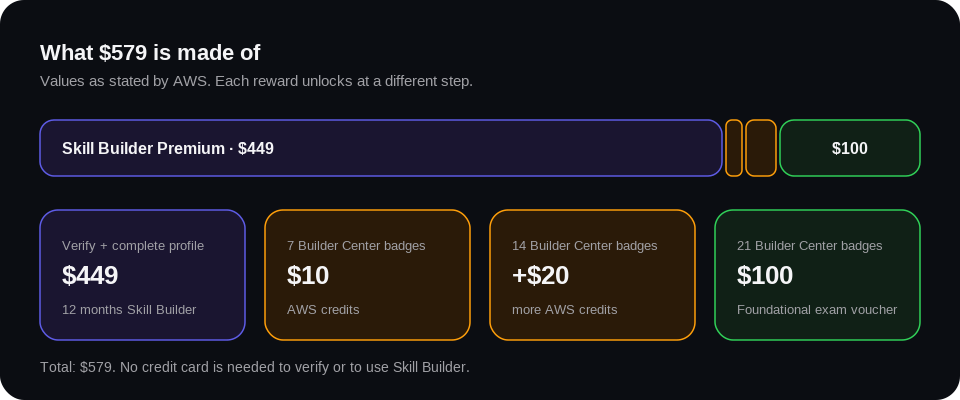 The $579, piece by piece. Values are as stated by AWS.
| Reward | Value | How you unlock it |
|---|---|---|
| 12 months of AWS Skill Builder | $449 | Verify as a student and complete your profile |
| AWS credits, first tranche | $10 | Earn 7 Builder Center badges |
| AWS credits, second tranche | $20 | Earn 14 Builder Center badges |
| AWS Foundational certification exam voucher | $100 | Earn 21 Builder Center badges |
| Total | $579 | Free for verified students |
How to claim it, step by step
The order matters. Most people who get stuck did step 3 before step 2, or skipped step 3 completely.
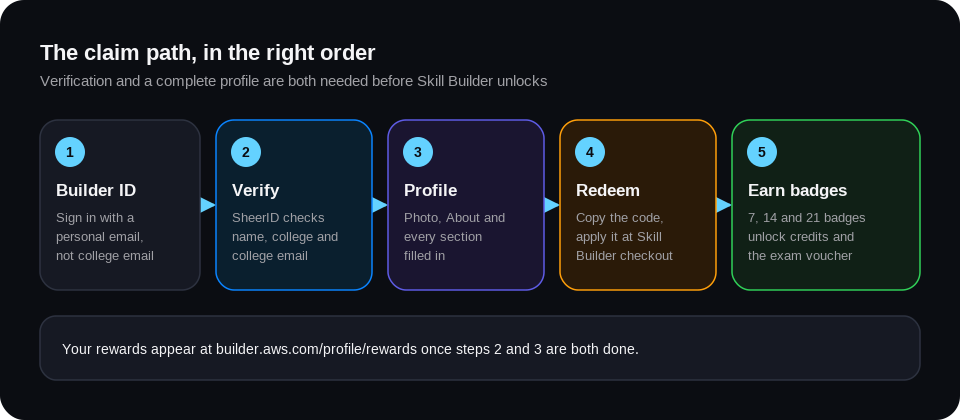 Five steps. The first four take about thirty minutes, most of it waiting.
Step 1: Sign in to Builder Center with a personal email
Go to builder.aws.com/student-rewards and sign in with your AWS Builder ID. If you don't have one, you can create it in a minute.
Use your personal email (Gmail or Outlook) for the Builder ID, not your college email. Your Builder ID carries your badges, articles and rewards, and you want to keep it after you graduate. College email accounts are often closed after you leave. Your college email comes in at the next step instead.
Already have a Builder ID? Use it. Don't create a second account.
Step 2: Verify that you are a student
On the Student Rewards page, click Verify. AWS uses SheerID, a third-party verification service. You will enter:
- Country: for example, India.
- College: search for your institution, for example Graphic Era (Deemed to be University), Dehradun.
- College email: your official address, for example
yourname@geu.ac.in. - Full name and date of birth: exactly as they appear in your college records.
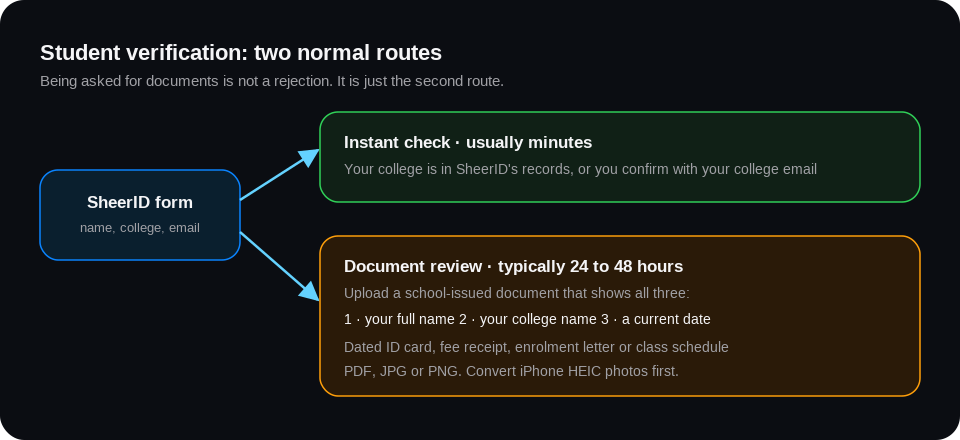 Being asked for documents is normal. It is not a rejection.
There are two normal outcomes:
- Instant: if SheerID already has records for your college, or confirms you through your college email, you are verified in minutes.
- Document review: if not, SheerID asks for a document. This usually takes 24 to 48 hours.
For document review, upload something school-issued that clearly shows all three: your full name, your college name (spelled the way you typed it), and a date in the current academic term. Good options:
- a student ID card with a current date or validity
- a fee receipt for this semester
- an enrolment or bonafide certificate
- a class schedule or registration receipt
Use PDF, JPG or PNG. iPhone photos are often HEIC, which gets rejected, so convert them first. If one document doesn't show all three details, upload two or three that do together. Don't upload anything that wasn't asked for, such as your passport or bank statements.
If you are rejected, or see "Verification Limit Exceeded", contact SheerID support at support.sheerid.com. Only SheerID can review documents or reset attempts.
Step 3: Complete your Builder Center profile
This step is the one people skip, and it blocks everything. Skill Builder does not unlock on verification alone. It unlocks when you are verified and your profile is complete.
Open your profile at builder.aws.com/profile and fill in every section:
- Photo: a clear profile picture.
- Public details: display name, alias (your handle) and a headline, such as "Student building with AWS Lambda and Amazon Bedrock".
- About: two or three lines on what you are learning or building.
- Social links, student details, personal details and interests.
It takes about ten minutes, and it is the most valuable ten minutes in this whole guide.
Step 4: Redeem your 12 months of Skill Builder
The subscription does not start automatically. You redeem it with a code:
- Go to builder.aws.com/profile/rewards. Your unlocked rewards appear here.
- Activate the Skill Builder reward and copy the redeem code.
- Open AWS Skill Builder and start buying the annual individual subscription.
- Apply the code at checkout. The total drops to $0.
- When asked how you want to access it, you can choose without an AWS account. That's it.
If the code fails at checkout or the page times out, don't create a new account. Check the Student Rewards FAQ on Builder Center, which covers both cases.
Step 5: Earn badges for credits and the exam voucher
Now the long game. Every badge you earn on Builder Center moves you up the ladder.
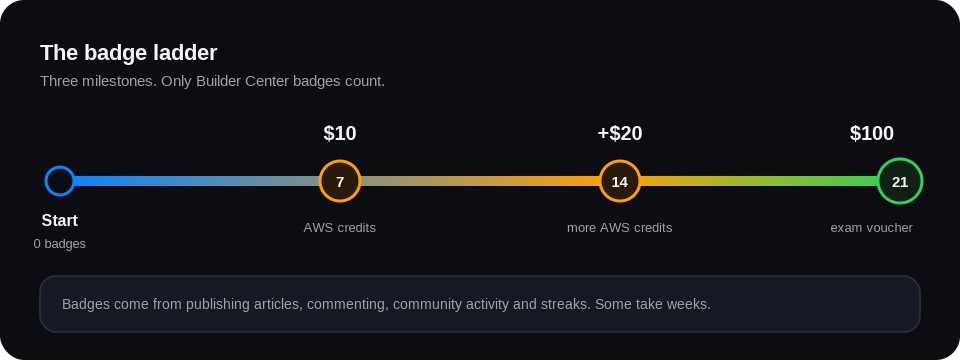 Three milestones. The voucher is a few weeks of steady activity, not a one-day prize.
Check your real badge count at builder.aws.com/profile/?tab=badges.
The mistake that costs people the voucher
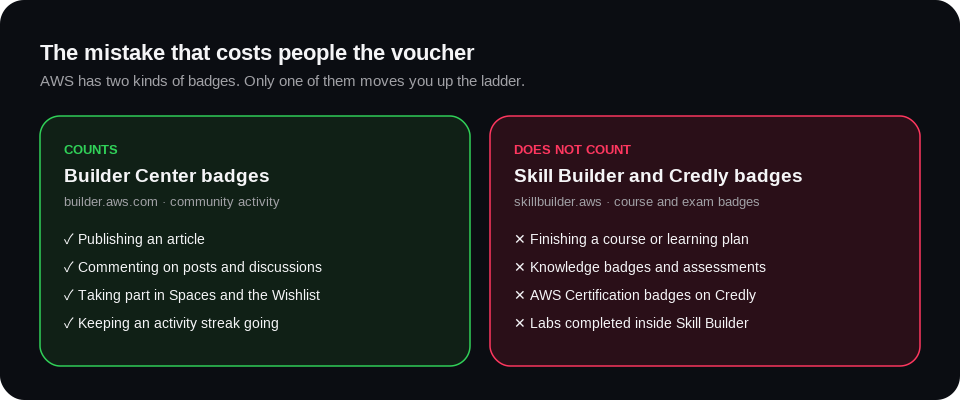 Finish 21 Skill Builder courses and you still have zero badges for this programme.
AWS has two kinds of badges, and they never mix:
- Builder Center badges come from community activity on builder.aws.com: publishing articles, commenting, taking part in Spaces and the Wishlist, and keeping a streak. These are the only ones that count.
- Skill Builder badges come from finishing courses, learning plans and assessments. Certification badges on Credly are separate again. Great for learning. They don't count toward Student Rewards.
So if you have been quietly finishing courses and waiting for the voucher, start posting.
How to earn 21 Builder Center badges
Read each badge's description on your badges tab, because some need one action and others need activity over several weeks. What works for most students:
- Write about what you build. A short article on a Lambda function, a DynamoDB table design or a Bedrock chatbot you made counts, and it doubles as your portfolio. Write it in your own words: AWS can suspend low-quality or copied content.
- Comment with substance. Answer a question you know, or ask a real one under an article. "Nice post" doesn't help anyone.
- Join Spaces for the topics you like, such as Serverless, Generative AI or DevOps, and take part in the discussions.
- Use the Wishlist. Post a wish for a feature you genuinely want, or support one you agree with.
- Show up daily. Streak badges reward consistency. Ten minutes a day beats one long session a month.
A simple weekly rhythm: one article, three thoughtful comments, and a few minutes every day. Expect 21 badges to take several weeks of steady activity, not a weekend.
Our 90-Day Quest Tracker
To keep this from feeling overwhelming, our team at AWS Student Builder Group GEU built a 90-Day Quest Tracker in the GEU Builder Portal. You set your starting point, add badges you already have, and get one small task a day, grouped into the three milestones: 7 badges, 14 badges and 21 badges. Ask in the group for the link.
Using your rewards well
The $100 exam voucher
Once you reach 21 badges, you claim the voucher manually from your rewards page. It covers one Foundational AWS certification exam, and both Foundational exams cost $100, so the voucher covers the full fee:
| Exam | Code | Good for |
|---|---|---|
| AWS Certified Cloud Practitioner | CLF-C02 | Your first cloud certification. Cloud basics, security, billing |
| AWS Certified AI Practitioner | AIF-C01 | AI and generative AI basics on AWS, including Amazon Bedrock |
The voucher can't be used for Associate exams such as Solutions Architect Associate. Note the expiry date when you claim it, and book your exam well before then. New to Cloud Practitioner? I wrote a study plan with the four exam domains here.
The $30 in AWS credits
Credits go into a real AWS account, which is the one reward that needs one. Creating an AWS account asks for a payment method. Redeem your codes in the AWS console under Billing and Cost Management, Credits, Redeem credit.
Spend them on things that teach you: a serverless REST API, a small Amazon Bedrock experiment, or the event-driven patterns every real app ends up needing. Set an AWS Budgets alert at $5 on day one, and read how serverless billing works so the credits last.
12 months of Skill Builder
The subscription includes 900+ courses, hands-on labs in real AWS environments, official exam preparation, and game-based learning such as AWS Cloud Quest. Twelve months sounds long, but it is a clock. Pick one goal in the first week, for example "Cloud Practitioner in 6 weeks, then Solutions Architect Associate", and follow one learning plan instead of browsing.
Common questions
My college isn't in the SheerID list. Can I still qualify? Yes. Your college doesn't need to be an AWS partner institution. If the instant check can't find your records, SheerID moves you to the document route, which works the same way.
I already have a Builder ID and some badges. Do they count? Use your existing Builder ID rather than making a new one. Check your badges tab to see where you stand.
Can I give my voucher or credits to a friend? Rewards are tied to your own verified account, so plan on your friend claiming their own. The FAQ has the exact rule.
What happens when I graduate? Your Builder ID stays yours, which is why it should use a personal email. For how long student rewards stay valid after graduation, check the Student Rewards FAQ on Builder Center.
All terms are in the official FAQ at builder.aws.com/faq, under Student Verification and Rewards. If anything there differs from this guide, the FAQ wins.
Don't do it alone
The voucher goes to people who show up in a community, so join one. AWS Student Builder Groups are student-led communities at universities in more than 60 countries. If you are at Graphic Era, AWS Student Builder Group GEU runs build sprints, workshops and study groups for Cloud Practitioner, AI Practitioner and Solutions Architect Associate. If you are somewhere else, find the group on your campus on Builder Center.
Verify today. The badges can come next week. The 12 months of Skill Builder are waiting the moment your profile is complete.
Found this useful?
Share it with your group