

Imagine you are building a website for a student event. Students visit the page, request a confirmation email, and expect the website to respond. Behind that simple button, a program has to receive the request and do the work.
I have spent the past year building a student community portal using serverless services. In this article, I will use a small teaching example to explain the basics. You do not need to know AWS or write code to follow the main explanation. There is also an optional first exercise if you want to try Lambda.
 Think of a request as a task that may need a little work before it is finished. Illustration generated for this article.
Start with what a server does
A server is a computer that runs software for other people or programs. When you open an event website, software running somewhere sends the page to your browser. Other software may handle forms, save information, or request an email.
You can manage that computer yourself: install what the application needs, keep it updated, and decide how much capacity it needs. With a service such as AWS Lambda, AWS manages the infrastructure that runs your code. You provide a small program and tell the service when to run it. This is one way to build a serverless application. (AWS Lambda overview)
The name can be confusing. Computers still run the application. Serverless means you can use managed services without taking on all the work of managing those computers yourself.
Think of a function as a small task
A function is a piece of code that does a particular job. For an event website, one function might check a request, while another prepares an email. In Lambda, a function can run when it receives an event. Here, an event simply means input that starts the work.
For example, the input might say which workshop a student chose. The function reads that input and returns a welcome message. You will try exactly that in the optional exercise below. We will start with one task, so you can see what goes in and what comes out.
Meet the services in our event example
For a larger application, several services can share the work. You do not need to remember all their names immediately. Focus on the job each one has in this example.
| Service | Its job here | An everyday comparison |
|---|---|---|
| API Gateway | Receives a request from the website | A reception desk |
| AWS Lambda | Runs a small piece of application code | A program assigned a task |
| Amazon SQS | Holds jobs until they are processed | A waiting list |
| Amazon SES | Provides the email sending service | An email dispatch service |
These comparisons are memory aids. The services are software, and a real application needs more detail than a reception desk or waiting list. For now, the useful idea is that each service has a clear responsibility.
Follow one email request
Suppose a student clicks Send my confirmation. API Gateway receives the website's request. A Lambda function checks it and adds an email job to SQS. A separate Lambda function handles that queued job and can ask SES to send the email.
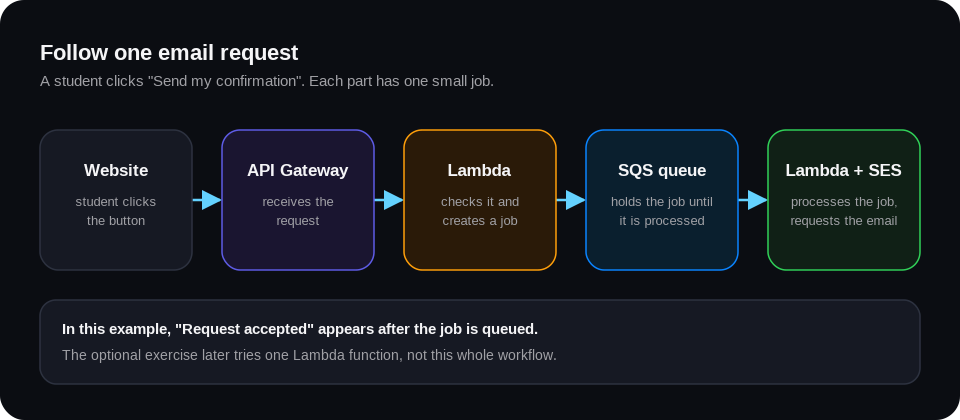 A simplified teaching example. The small exercise later in this article uses only one Lambda function.
Why use a queue? Think about a college help desk during a busy event. A student can submit a request without the desk finishing every task immediately. A queue gives the application a way to hold work while another part processes it. Lambda can be connected to SQS to process those messages. (How Lambda works with SQS)
This can help the website respond before the longer task finishes. It also means we must check what happens to the task afterward. A queue is useful, but adding a job to it does not make the rest of the work succeed automatically.
Understand the message shown to the student
Imagine the application displays Request accepted after successfully adding the job to the queue. That message confirms one step: the application accepted the work. We still need to find out whether the sending program processed the job and what happened to the email.
An everyday example is ordering food. Order accepted tells you the restaurant received the order. Food delivered tells you something happened later. Both messages are useful, but they describe different stages.
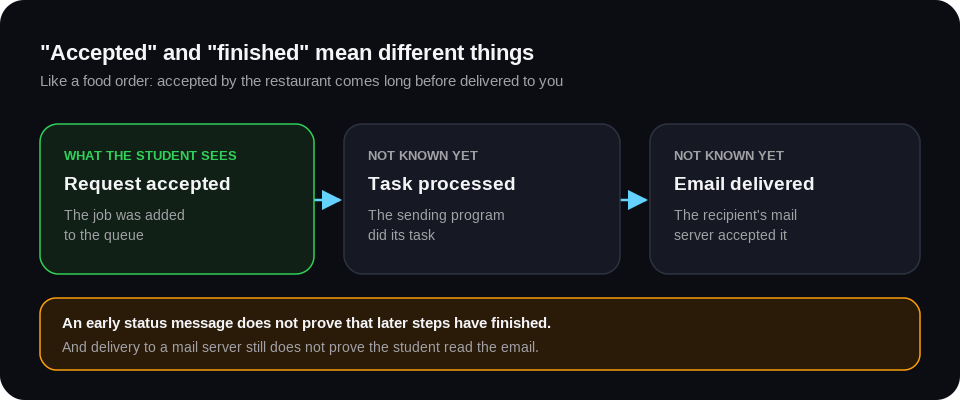 A message about an early step cannot tell us everything about the steps that follow.
Email services have their own stages too. SES accepting a send request is different from delivering the message to the recipient's mail server. Even that delivery does not establish that the student read it. This is why useful status messages say what the application actually knows. (Email sending and delivery in SES)
Try your first Lambda function
This exercise is optional. It shows a function receiving input and returning an answer. You will not build the whole email workflow, create a queue, or send an email. If you are just learning the idea today, you can read the code and predict its answer without creating any resources.
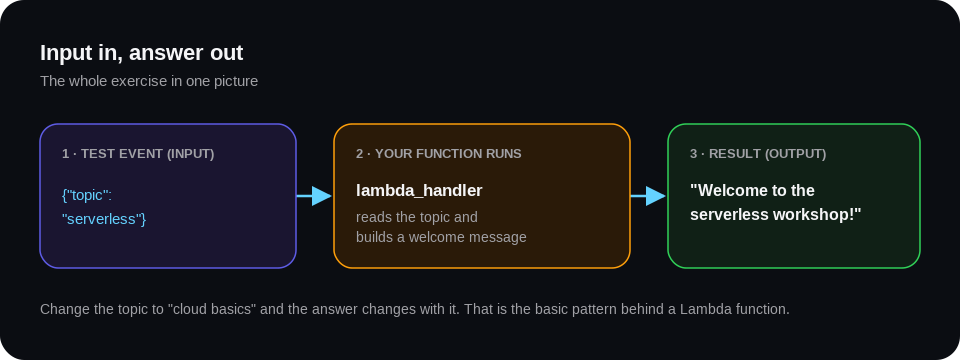 The whole exercise in one picture: input in, answer out.
Create the function
If you want to run it, use an AWS account you are allowed to work in. Open the Lambda console and create a function from scratch. Name it student-event-welcome and choose a supported Python runtime. For permissions, let the console create a new role with basic Lambda permissions, if your account allows this. That role is how the function receives permission to use AWS resources.
Keep the default Python handler, lambda_function.lambda_handler. Replace the starter code with this example, then choose Deploy to save the code that Lambda will run. Console labels may vary slightly. (Python in AWS Lambda)
def lambda_handler(event, context):
    topic = event.get("topic", "serverless")
    return {
        "message": f"Welcome to the {topic} workshop!"
    }
Give it a test input
Create a test event in the Lambda console and enter this JSON. JSON is a common way to write data as names and values. Here, topic is the name, and serverless is its value.
{"topic": "serverless"}Run the test. With this input, the function should return the following object. This is the expected answer from the code; check the result in your own account if you run it.
{"message": "Welcome to the serverless workshop!"}Make one small change
Change the test input's topic from serverless to cloud basics, and run it again. Predict the message before you look at the result. The function uses the topic you supply, so changing that value changes the welcome message.
You have now followed the basic pattern: give a function some input, let it run, and inspect its output. A console test is a direct test of the function. Connecting it to a website is a separate step for a later lesson.
Know what you still look after
AWS managing infrastructure does not mean it writes your application for you. You still decide what the program should do, who can use it, and what information it can access. You also need to handle errors and make sure the application gives users useful messages.
When something goes wrong, logs can help. A log is a record written by the running program. Lambda can send logs to Amazon CloudWatch when it has permission. In an email workflow, you might look for a record showing whether the sending task ran. Treat a record of one step as evidence of that step. (Viewing Python Lambda logs)
There can also be costs. Check the terms and pricing for your account rather than assuming every exercise is free. A budget notification can help you track spending, but it is not an instant spending cap. Delete the practice function when you finish, and remove its log group and role only if you created them for this exercise and they are not used elsewhere. (AWS Budgets)
Where to go next
For a first lesson, aim to explain the purpose of a function and follow one request through an application. After that, you can connect a function to an API, save some data, and then try a queue. Learning those parts one at a time makes it easier to see what each one adds.
The example here is a teaching model inspired by student community applications. It does not claim to reproduce the complete portal or event system I built. A later hands-on lesson can explore the queue and email parts once the first function feels familiar.
Ready for the next step? These posts pick up where this one stops:
- What Is Serverless? A Practical Guide for the bigger picture.
- Build a Serverless REST API with Lambda, API Gateway and DynamoDB to connect a function to an API.
- Event-Driven Serverless with EventBridge, SQS and SNS for the queue part.
A quick question you can answer on its own
A student clicks a button to request an event confirmation email. The application successfully adds an email job to Amazon SQS, a queue that holds work for a program to process. The application then shows Request accepted. You have no information yet about what happened after the job entered the queue.
What can you say for sure from this information?
- A. The email has reached the student's inbox.
- B. The email job was accepted for processing, but its final outcome is still unknown.
- C. The student's email address is incorrect.
Pick a letter and explain your choice in one or two sentences before you read on. All the information you need is in the scenario above.
The answer
B. "Request accepted" only confirms that the job entered the queue. Nothing in the scenario says the job was processed, the email was sent, or that it reached the inbox, so A claims too much. Nothing suggests the address is wrong either, so C has no evidence behind it.
Further reading
Found this useful?
Share it with your group