
Some sessions you attend. Some sessions rearrange how you think.
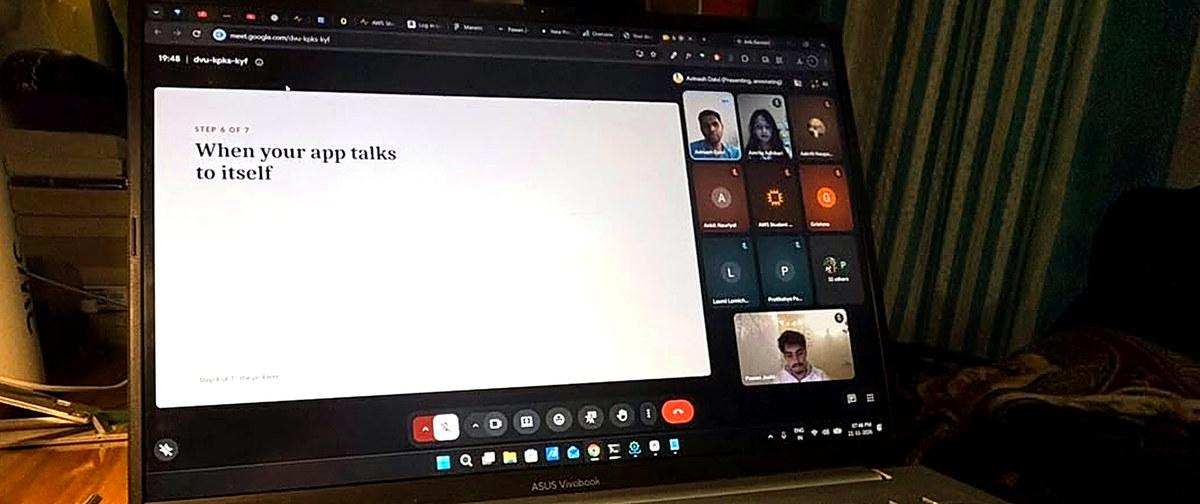
On the evening of 21 November 2026, at 7 pm, the AWS Student Builder Group at Gandaki College of Engineering and Science in Pokhara, Nepal organised a one-hour session on Google Meet with AWS Serverless Hero Avinash Dalvi, and I joined in. One hour, with a slide on screen that said "Step 6 of 7: When your app talks to itself", and by the end I had rewritten my whole plan for learning AWS.
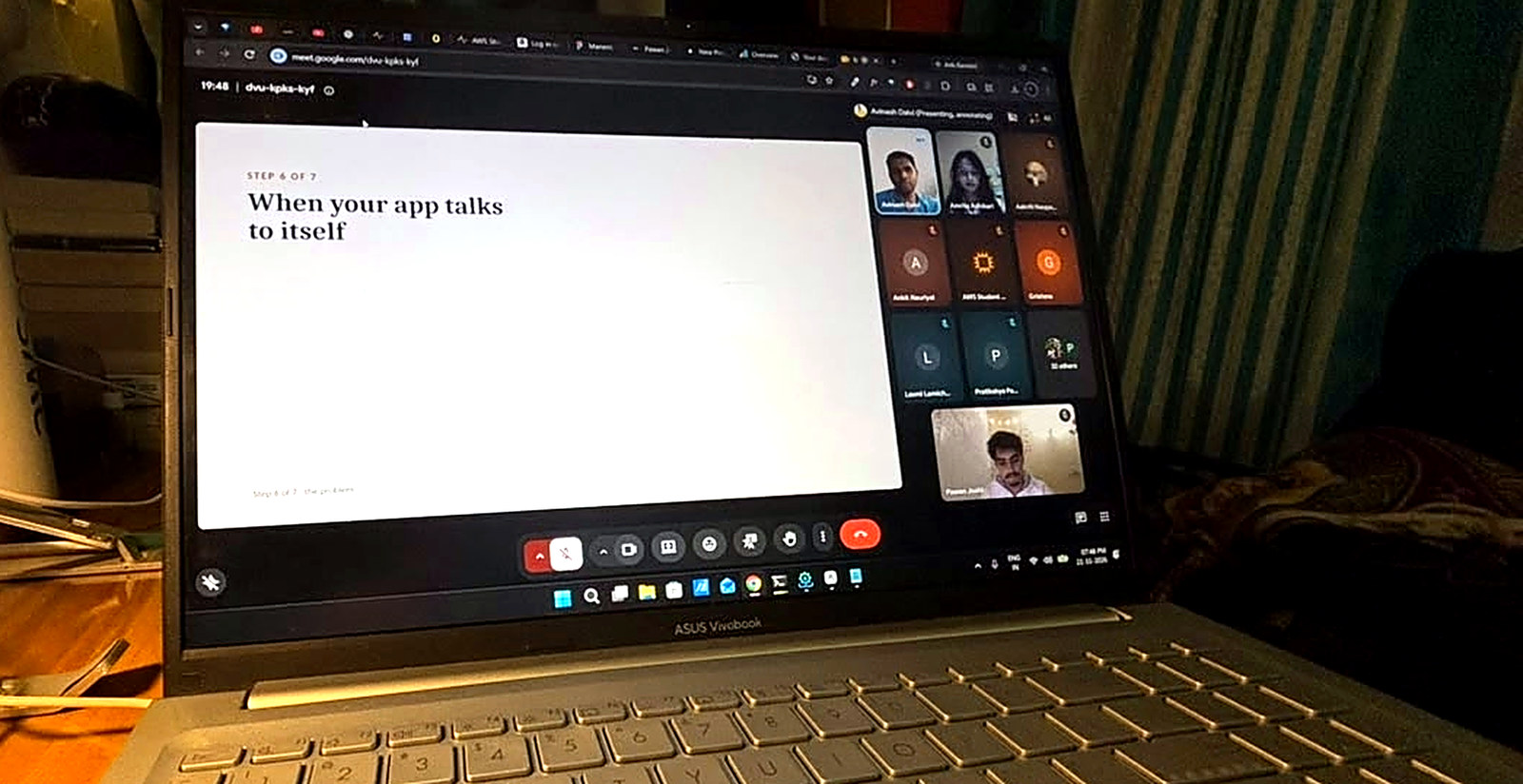 Live on Google Meet at 7:48 pm: Avinash presenting step 6 of 7.
This post is everything I took away from that hour, written for every student and community builder who keeps asking the same question we all ask: what is the best way to learn AWS today?
Quick summary
- Don't learn AWS. Build with AWS. Real projects teach what tutorials can't.
- Certifications are a map, not the destination. They give you a structured path. Pair them with scripting.
- Use AI as a companion, not a builder. Ask it to explain, review and break your system, then fix it yourself.
- Serverless or EC2? It depends. Students and builders on a small budget should usually start serverless.
- Lambda, SQS and SNS are the three services that make most simple serverless apps work.
- The people who know the most explain things the most simply.
Who is Avinash Dalvi?
If you are in the AWS community, you have probably read something he wrote. Avinash is a tech architect with more than 16 years of building web applications. He was named an AWS Serverless Hero in September 2026, and he co-organizes AWS User Group Bengaluru. He also writes the monthly newsletter AWS for Product Builders and shares deep, practical posts on his blog, Internet Katta.
He is heading to AWS re:Invent soon, and he still said yes to spending an evening with a student community. That says a lot about the kind of person he is.
You can find his AWS profile on AWS Builder Center.
Lesson 1: "Don't learn AWS. Build with AWS."
This was the line of the evening, and the one I keep repeating to everyone since:
Don't learn AWS. Build with AWS. That is how you learn AWS.
It sounds like a small change in words. It is a big change in method.
When you learn AWS, you watch a video about S3, nod, and move on. A week later you remember that S3 "stores files". When you build with AWS, you try to host your portfolio on S3, hit an "Access Denied" error, discover bucket policies, find out why CloudFront is in front of it, and suddenly you understand S3, IAM and CDNs at the same time. You didn't plan to learn three services. The project made you.
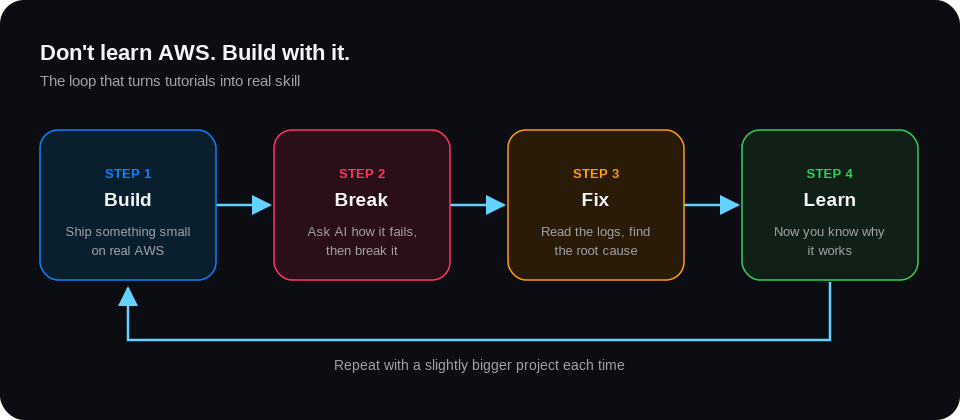 The loop I am following from now on: build, break, fix, learn, repeat.
Here is what "build with AWS" looks like for a student, in order of difficulty:
| Project | What it teaches you |
|---|---|
| Host your portfolio on S3 and CloudFront | Buckets, policies, HTTPS, caching |
| A contact form with API Gateway and Lambda | Serverless functions, permissions, logs |
| A to-do API with DynamoDB | NoSQL design, IAM least privilege |
| Image resize on S3 upload | Event-driven design, triggers |
| Event registration with SQS and SNS | Queues, fan-out, retries |
| The same app, written in AWS SAM or CDK | Infrastructure as code |
Pick one. Finish it. Then pick the next one. That is the curriculum.
Lesson 2: Certifications are a pathway, and scripting is the engine
Avinash didn't dismiss certifications. He called them one of the good ways to learn, because they give you a structured pathway. Without one, AWS feels like 200 services and no starting point.
The order most students follow:
- AWS Certified Cloud Practitioner (CLF-C02) for the big picture: what the cloud is, core services, security and billing. I wrote a study plan for it here.
- Solutions Architect Associate or Developer Associate, once you have built a few things. This is where design and real code come in.
But he added something that often gets skipped: you need to learn scripting. Clicking around the AWS console is fine for exploring. Real work is repeatable, and repeatable means code.
- Bash or PowerShell, so you are comfortable in a terminal.
- Python with boto3, or JavaScript with the AWS SDK, to talk to AWS from code.
- The AWS CLI, to do anything without opening a browser.
- Infrastructure as code (AWS SAM, CDK or CloudFormation), so your whole project can be created and deleted with one command.
A tiny example. This one line lists every Lambda function in your account, something that takes several clicks in the console:
aws lambda list-functions --query "Functions[].FunctionName" --output tableOnce things like this feel natural, the certification content stops being theory.
Lesson 3: In the age of AI, make AI your companion
This was the part I was most curious about, and his answer was sharp.
Ask AI to be your companion. Don't ask AI to build the thing for you.
If AI writes your whole project, you have a project and no skill. The next time it breaks, you are just as lost as before. Instead, use AI for the things a great senior engineer would do for you:
- Explain. "Why does my Lambda need an execution role? Explain it like I'm new."
- Review. "Here is my IAM policy. What is too broad, and why?"
- Quiz. "Ask me five questions about SQS visibility timeouts and check my answers."
- Break. This one changed how I think.
Break the system on purpose
He made a point that anyone who has worked in a company will recognize: systems break. Often. At the worst time. And the people who are valuable are the ones who stay calm and know where to look.
So train for it. Build something small, then ask AI to help you break it, and fix it yourself:
| Break it like this | What you learn when you fix it |
|---|---|
| Remove one permission from the Lambda role | Reading AccessDenied errors in CloudWatch Logs |
| Set the function timeout to 1 second | Timeouts, retries and how errors surface to users |
| Set reserved concurrency to 0 | Throttling, and what a 429 actually means |
| Send a message your consumer can't parse | Dead-letter queues and poison messages |
| Delete the DynamoDB table name variable | Configuration, environment variables, crash logs |
| Block the API's origin in CORS | Browser errors versus server errors |
When you get comfortable, AWS even has a managed service for this called AWS Fault Injection Service, used for controlled chaos experiments. But you don't need it to start. A broken permission and a log group are enough.
A prompt that works well:
I built an API Gateway + Lambda + DynamoDB app. Give me 5 realistic
ways it could fail in production. For each one, tell me how to cause it
safely in my own dev account, but do NOT tell me the fix. I'll find it
in the logs and come back to you with my answer.
That last line is the whole trick. AI becomes your sparring partner, not your ghostwriter.
The question we all wanted to ask: serverless or EC2?
Someone asked the question that comes up in every student group: should we master EC2, or is serverless better? Which one scales better?
His answer was honest: it depends. If you are a student, or a builder who doesn't want to invest much money, start with serverless, because you pay only when your code runs and there are no servers to look after. If you have a budget and a reason to run servers, EC2 is a great choice. And above all, it depends on the use case.
That answer is exactly right. Let me unpack "it depends" a little further, because it is the most important phrase in cloud architecture.
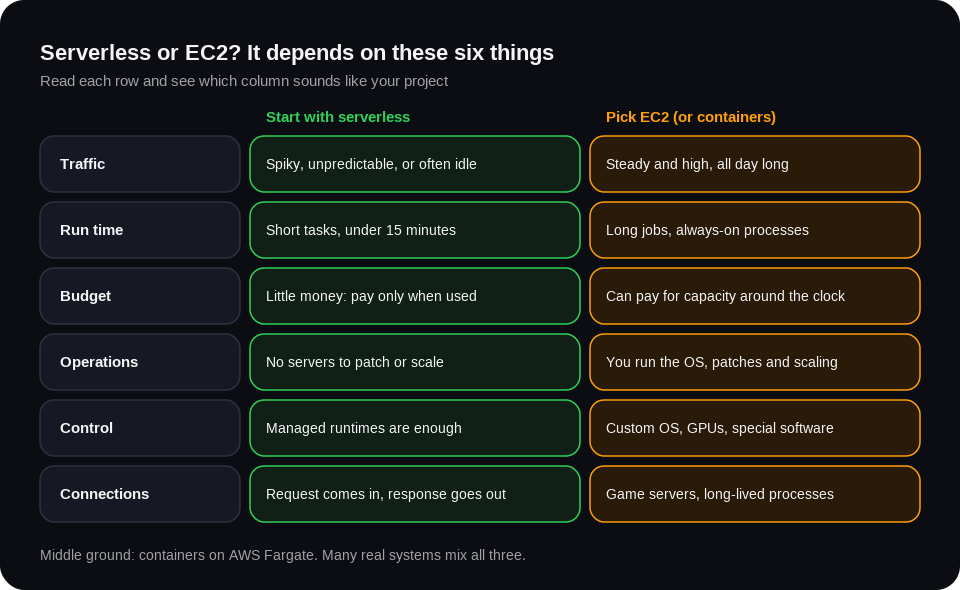 Six questions that turn 'it depends' into a real decision.
A few things worth knowing:
- Both scale. Lambda scales automatically, one environment per concurrent request. EC2 scales too, with Auto Scaling groups, but you design and pay for that capacity.
- Serverless isn't always cheaper. For spiky or low traffic, it usually is. For heavy traffic that runs all day, a right-sized EC2 instance or container can cost less per request.
- EC2 is not "for rich people only". It has a free tier, and small instances are cheap. The real cost of EC2 is often your time: patching, monitoring and scaling it yourself.
- There is a middle ground. Containers on AWS Fargate give you more control than Lambda without managing servers.
- Real systems mix. A Lambda API, an EC2 box for a long-running job and a Fargate service for a container are common together.
My student version of the rule: start serverless, learn EC2 alongside it, and move a piece to EC2 or containers when you have a concrete reason, such as jobs longer than 15 minutes, special software, or steady heavy load. And yes, learn EC2 properly. Knowing what runs underneath makes you better at serverless too. (If you have ever fought with SSH, this guide is for you.)
How Lambda actually works
Avinash walked us through Lambda basics, and the way he explained it made the "magic" disappear. Lambda isn't magic. There is a real machine. You just never manage it.
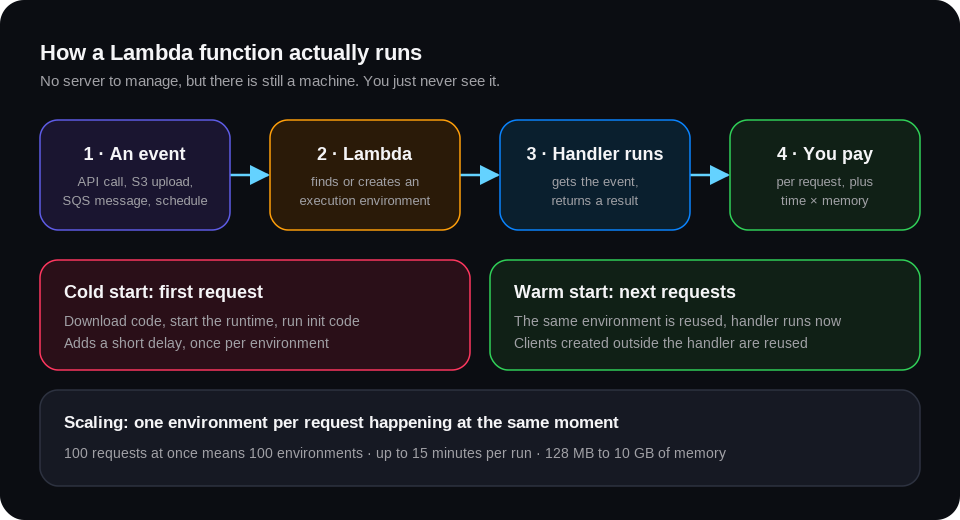 From event to bill: the four steps behind every Lambda invocation.
In plain words:
- Something happens. An HTTP request, a file landing in S3, a message in SQS, or a schedule.
- Lambda finds a ready environment, or creates a new one. Creating one is a cold start: download your code, start the runtime, run your setup code.
- Your handler runs with the event, and returns a result.
- You pay for the number of requests and the time your code ran, multiplied by the memory you chose.
The next request often reuses the same warm environment, which is why anything you create outside the handler (database clients, SDK clients) is reused and fast. If 100 requests arrive at the same moment, Lambda runs 100 environments side by side. That is the scaling story in one sentence.
A complete function really is this small:
// Created once per environment, reused on warm starts.
const startedAt = new Date().toISOString();

export const handler = async (event) => {
  const name = event.queryStringParameters?.name ?? "builder";
  return {
    statusCode: 200,
    headers: { "content-type": "application/json" },
    body: JSON.stringify({ message: `Hello, ${name}!`, environmentStartedAt: startedAt }),
  };
};
Call it twice quickly and environmentStartedAt stays the same. That is a warm start you can see with your own eyes. Want to go deeper? I wrote about what causes cold starts and eight ways to reduce them.
Why Lambda is a great teacher
- No idle cost. A project nobody is using costs close to nothing, which matters on a student budget.
- Fast feedback. Deploy, test, read the log, change, repeat, in minutes.
- It forces good habits. Small functions, clear permissions and stateless code are good design anywhere.
- It connects to everything. S3, DynamoDB, SQS, SNS, EventBridge and API Gateway all trigger it.
When your app talks to itself: SQS and SNS
The slide I photographed was "Step 6 of 7: When your app talks to itself". This is the moment an app grows from one function into several parts, and the parts need to talk.
The beginner way is to have one part call the next directly. It works until one of them is slow or down, and then everything fails together. The fix is to put a message in between.
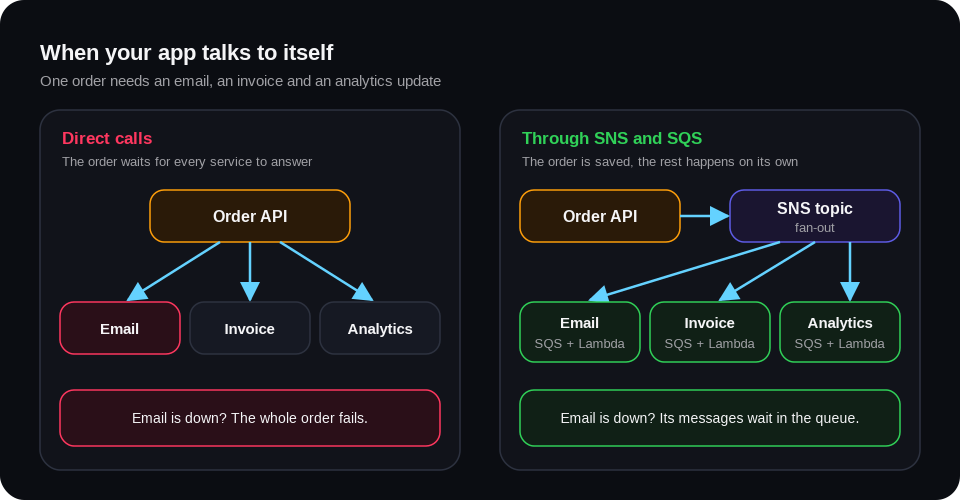 Direct calls fail together. Messages let each part fail, retry and recover on its own.
- Amazon SQS is a queue: a to-do list for your app. One part drops a job in, another picks it up when ready. If the worker is down, the job waits. If it fails, SQS retries it, and after enough failures moves it to a dead-letter queue so you can inspect it.
- Amazon SNS is a loudspeaker: one message, many listeners. Publish "order placed" once, and the email, invoice and analytics parts each get their own copy.
- Together, SNS in front of several SQS queues is one of the most common patterns on AWS, because each consumer gets its own buffer and its own retries.
Here is how small a queue consumer is in Lambda. Returning the failed IDs means only the broken messages are retried, not the whole batch:
export const handler = async (event) => {
  const batchItemFailures = [];
  for (const record of event.Records) {
    try {
      const order = JSON.parse(record.body);
      await sendConfirmationEmail(order); // your logic
    } catch (error) {
      console.error("Failed message", record.messageId, error);
      batchItemFailures.push({ itemIdentifier: record.messageId });
    }
  }
  return { batchItemFailures };
};
(For this to work, turn on ReportBatchItemFailures in the SQS event source mapping.) I went much deeper on queues, topics and EventBridge in Event-Driven Serverless on AWS.
Simple AWS architecture, explained simply
The best part of the session wasn't any single service. It was how he put them together, one step at a time, until a "complex" architecture looked obvious. This is my redraw of the idea:
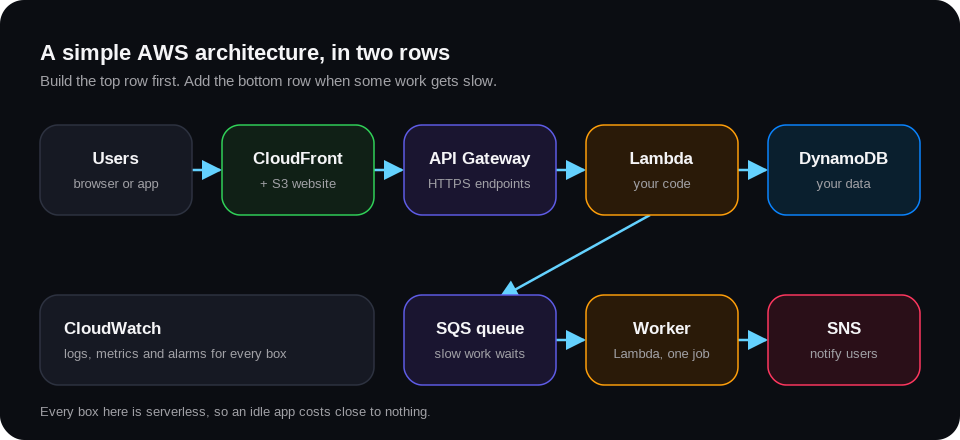 Start with the top row. Add the bottom row only when some work gets slow.
Read it as a story:
- A user opens your site, served fast from CloudFront and S3.
- The site calls your API on API Gateway.
- Lambda runs your code and saves data in DynamoDB. Reply sent. Done.
- Something slow, like generating a PDF or sending 500 emails, goes into an SQS queue instead of making the user wait.
- A worker Lambda processes the queue at its own pace.
- SNS tells the user when it's done.
- CloudWatch watches every box, so when something breaks (and it will), you know where.
That is a production-shaped app, and every piece can be learned in a weekend. If you want to build the top row step by step, start with my serverless REST API tutorial, and keep this cost guide open so the bill stays near zero.
What I'm doing differently from tomorrow
- Fewer courses, more projects. One project from the table above every two weeks.
- A break-it day every week. Break my own app on purpose and fix it from the logs.
- AI as a sparring partner. Ask it to quiz me and to cause failures, never to hand me the finished code.
- Scripting first. Everything I build must be deployable with one command.
- Serverless first, EC2 on purpose. And learn both well enough to explain the trade-off.
Thank you, Avinash
There is a saying that if you can't explain something simply, you don't understand it well enough. That evening was the reverse proof. Someone who understands AWS deeply made Lambda, queues and architecture feel simple to a room full of students.
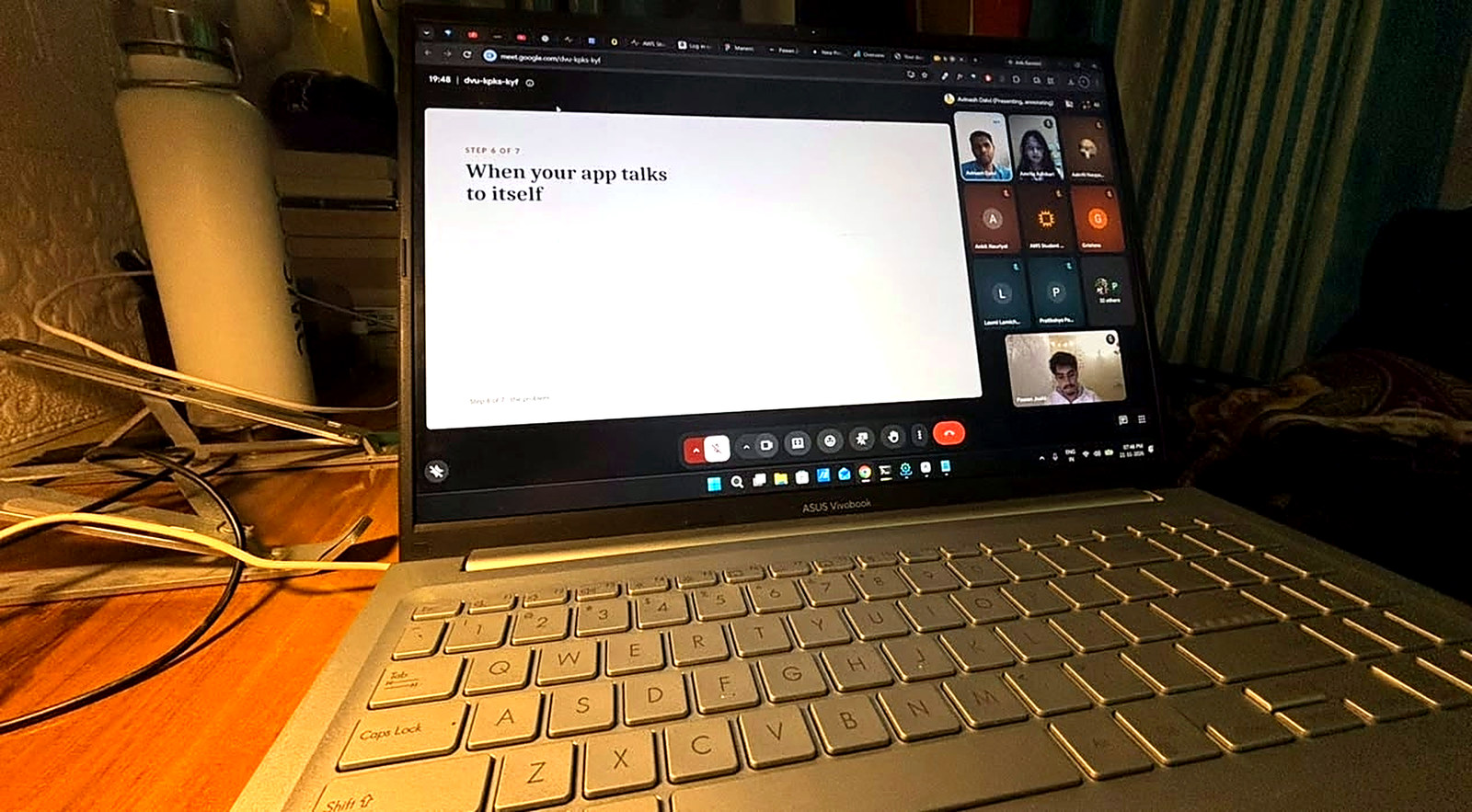 My desk at 7:48 pm: one slide, one Hero, a lot of notes.
Thank you, Avinash, for accepting the invitation, for answering every question honestly (even when the honest answer was "it depends"), and for giving students one of your evenings right before re:Invent. That one hour made my day, and I think it changed how many of us will learn from now on.
And thank you to the AWS Student Builder Group at Gandaki College of Engineering and Science for organising it and welcoming me in. Two campuses, two countries, one session: that is what these communities are for.
To everyone who joined: now go build something. Then break it. Then fix it. And if you are at Graphic Era, come build with us at AWS Student Builder Group GEU.
Found this useful?
Share it with your group