
A serverless backend and a SwiftUI app are a great match. The backend scales from zero and costs almost nothing while you're small, and the app gets a clean HTTPS API to talk to.
In this guide you'll connect a SwiftUI app to the notes API from Build a Serverless REST API with AWS Lambda, API Gateway and DynamoDB. The same pattern works for any JSON API.
What we're building
- A notes list that loads from the API.
- Loading, empty and error states that look native.
- Pull to refresh and adding a note.
- A small, reusable API client using
async/await.
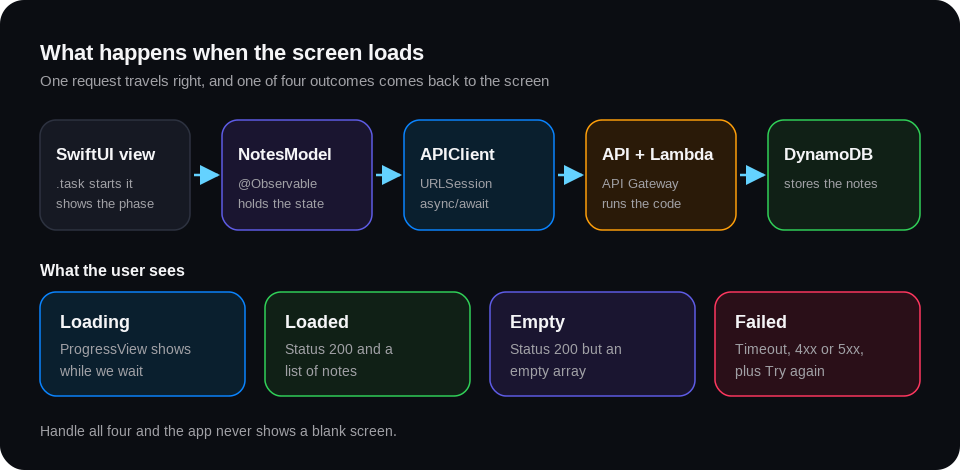 One request goes out, and the screen ends up in exactly one of four states.
Step 1: Model the data with Codable
The API returns notes like this:
{ "id": "3f2c9d1a", "text": "My first note", "createdAt": "2026-11-20T09:30:00.000Z" }Match it with a Codable struct:
import Foundation
struct Note: Codable, Identifiable, Hashable {
let id: String
let text: String
let createdAt: Date
}
struct NewNote: Encodable {
let text: String
}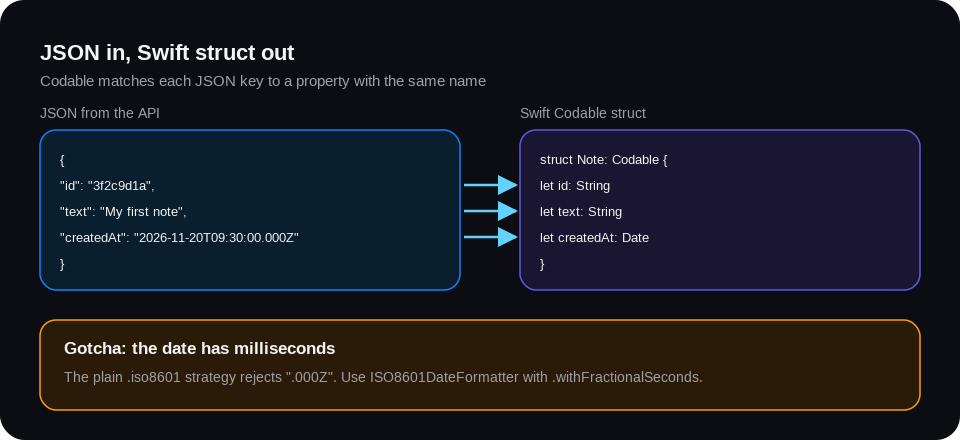 Codable matches JSON keys to property names. Watch the date format.
Step 2: Write a small API client
Keep networking in one place so views stay simple:
import Foundation

enum APIError: LocalizedError {
    case badStatus(Int)
    case decoding

    var errorDescription: String? {
        switch self {
        case .badStatus(let code): "The server returned an error (\(code))."
        case .decoding: "The server sent data the app didn't understand."
        }
    }
}

struct APIClient {
    var baseURL = URL(string: "https://abc123.execute-api.ap-south-1.amazonaws.com")!
    var token: String? = nil

    private let decoder: JSONDecoder = {
        let decoder = JSONDecoder()
        decoder.dateDecodingStrategy = .custom { decoder in
            let string = try decoder.singleValueContainer().decode(String.self)
            let formatter = ISO8601DateFormatter()
            formatter.formatOptions = [.withInternetDateTime, .withFractionalSeconds]
            guard let date = formatter.date(from: string) else {
                throw DecodingError.dataCorrupted(.init(codingPath: decoder.codingPath, debugDescription: "Bad date"))
            }
            return date
        }
        return decoder
    }()

    private func request(_ path: String, method: String = "GET", body: Data? = nil) -> URLRequest {
        var request = URLRequest(url: baseURL.appending(path: path))
        request.httpMethod = method
        request.httpBody = body
        request.timeoutInterval = 15
        request.setValue("application/json", forHTTPHeaderField: "Content-Type")
        if let token { request.setValue("Bearer \(token)", forHTTPHeaderField: "Authorization") }
        return request
    }

    private func send<T: Decodable>(_ request: URLRequest) async throws -> T {
        let (data, response) = try await URLSession.shared.data(for: request)
        let status = (response as? HTTPURLResponse)?.statusCode ?? 0
        guard (200..<300).contains(status) else { throw APIError.badStatus(status) }
        do { return try decoder.decode(T.self, from: data) } catch { throw APIError.decoding }
    }

    func notes() async throws -> [Note] {
        try await send(request("notes"))
    }

    func create(_ text: String) async throws -> Note {
        let body = try JSONEncoder().encode(NewNote(text: text))
        return try await send(request("notes", method: "POST", body: body))
    }
}
The API returns dates with milliseconds (.000Z), which the plain .iso8601 strategy doesn't accept. That's why the decoder uses a formatter with .withFractionalSeconds. This one detail causes a lot of "the data couldn't be read" errors.
Step 3: Hold the screen's state in an @Observable model
import Observation

@MainActor
@Observable
final class NotesModel {
    enum Phase { case loading, loaded, failed(String) }

    private(set) var notes: [Note] = []
    private(set) var phase: Phase = .loading
    private let api = APIClient()

    func load() async {
        do {
            notes = try await api.notes().sorted { $0.createdAt > $1.createdAt }
            phase = .loaded
        } catch {
            phase = .failed(error.localizedDescription)
        }
    }

    func add(_ text: String) async {
        do {
            let note = try await api.create(text)
            notes.insert(note, at: 0)
        } catch {
            phase = .failed(error.localizedDescription)
        }
    }
}
@MainActor guarantees every UI update happens on the main thread, which prevents a whole class of crashes.
Step 4: Build the view with every state
import SwiftUI
struct NotesView: View {
@State private var model = NotesModel()
@State private var draft = ""
var body: some View {
NavigationStack {
content
.navigationTitle("Notes")
.task { await model.load() } // runs when the view appears, cancels when it disappears
.refreshable { await model.load() } // pull to refresh
.safeAreaInset(edge: .bottom) { composer }
}
}
@ViewBuilder private var content: some View {
switch model.phase {
case .loading:
ProgressView("Loading notes")
case .failed(let message):
ContentUnavailableView {
Label("Couldn't load notes", systemImage: "wifi.exclamationmark")
} description: {
Text(message)
} actions: {
Button("Try again") { Task { await model.load() } }
}
case .loaded where model.notes.isEmpty:
ContentUnavailableView("No notes yet", systemImage: "note.text", description: Text("Write your first note below."))
case .loaded:
List(model.notes) { note in
VStack(alignment: .leading, spacing: 4) {
Text(note.text)
Text(note.createdAt, style: .relative).font(.caption).foregroundStyle(.secondary)
}
}
}
}
private var composer: some View {
HStack {
TextField("New note", text: $draft)
.textFieldStyle(.roundedBorder)
Button("Add") {
let text = draft.trimmingCharacters(in: .whitespaces)
guard !text.isEmpty else { return }
draft = ""
Task { await model.add(text) }
}
.buttonStyle(.borderedProminent)
}
.padding()
.background(.bar)
}
}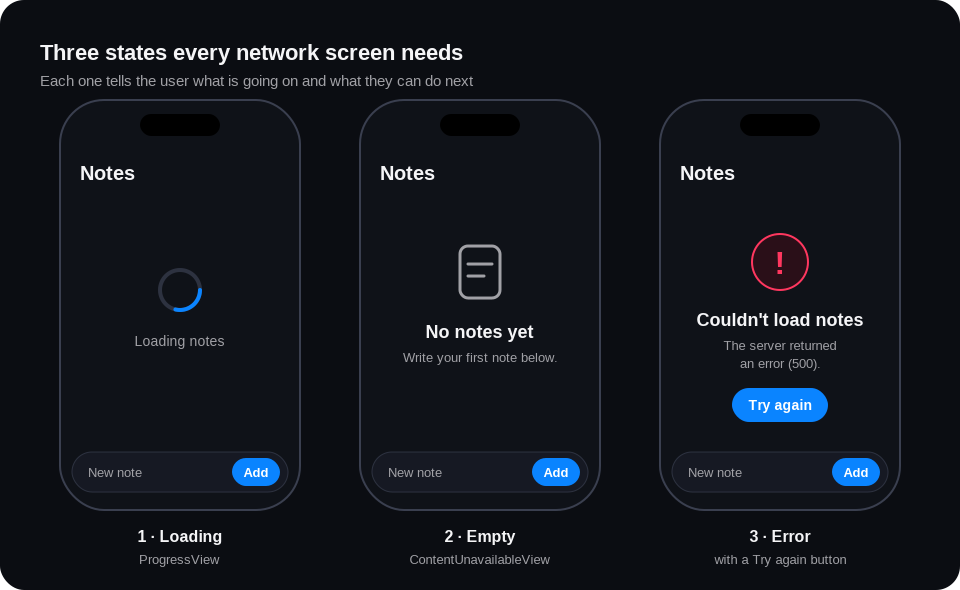 What the three non-happy states look like on the phone.
Step 5: Add authentication when you're ready
Once the API uses a JWT authorizer (see Secure Your Serverless API on AWS), sign the user in, keep the token in the Keychain, and pass it to the client:
let api = APIClient(token: savedToken)Never store tokens in UserDefaults or in plain files. The Keychain is encrypted and designed for this.
Mistakes to avoid
| Mistake | Why it hurts | Do this instead |
|---|---|---|
| Updating UI from a background task | Purple runtime warnings and random crashes | Mark UI models @MainActor |
| Ignoring HTTP status codes | A 500 error page gets decoded as "bad data" | Check the status before decoding |
Loading in onAppear with a Task you never cancel | Duplicate requests when the view appears again | Use .task, which cancels automatically |
| Hard-coding the API URL in many files | Painful to switch between test and production | One APIClient with a configurable baseURL |
| Putting AWS keys in the app | Anyone can extract them from the app | Keep secrets in Lambda; the app only gets user tokens |
| No timeout | The spinner can hang for a long time on bad networks | Set timeoutInterval |
Key takeaways
- Model API data with
Codable, and match the server's date format exactly. - Keep networking in one small client and screen state in an
@MainActor @Observablemodel. - Show loading, empty and error states with
ProgressViewandContentUnavailableView. - Use
.taskand.refreshablefor loading, and keep tokens in the Keychain.
This app builds and runs from Windows with the GitHub Actions workflow. When something goes wrong, use Debug iPhone Apps from Windows to find out why.
Found this useful?
Share it with your group